DocuClip Studio › 3D network diagram video maker
Browser tool
A 3D network diagram video maker for explainers
Some stories are about relationships: which supplier feeds which factory, which treaty tied which states together, which idea led to which invention. DocuClip Studio’s 3D Concept & Network Diagrams engine lays those relationships out as nodes on a board and draws the connection lines one by one, in step with your narration.
⚡ Customize This Sample Free in Studio (Sign In Free) →
Opens the Semiconductor Supply Chain sample in the studio after a free sign-in (e-mail sign-in, no card).
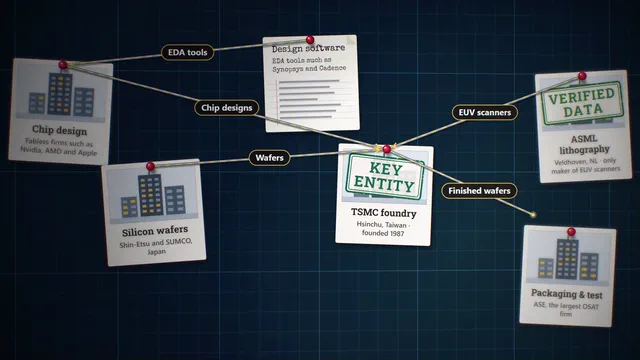
What the engine draws
Each node is an entity in your story: a person, an organisation, an institution, a location, a document, a photo or a short note. Connection lines join the nodes and draw themselves on cue, as curved lines or as flow lines, and each line can carry a short label such as “wafers” or “1957 treaty”. Tags mark what a node is in the story: Primary Source, Key Entity, Verified Data, Milestone or Archive. A soft depth of field keeps the node in focus sharp and the rest of the board quiet.
The sample
The sample on this page is a supply-chain network: design houses, a foundry, equipment makers and assemblers joined by the materials and parts that move between them. Open it to see how the nodes, the connection lines and the camera moves sit on the timeline. Rename the nodes, add your own, change the labels on the lines, and the board lays itself out again in the order the nodes appear.
Building a clear diagram
Start with the question the diagram answers, then keep only the five to ten entities the viewer has to remember. Add them in the order your narration introduces them and connect them as each relationship is explained, so the board grows with the story instead of appearing all at once. Choose the whole-board view when the shape of the network matters more than any one node; otherwise let the camera move from node to node as each line draws.
Looks, photos and sound
The board comes in several looks, including a dark obsidian board and a blueprint style, so a diagram matches the rest of your video. Photos you add to a node are processed on your own device and are not uploaded. Each node and each line has a soft cue in the sound design, which gives the sequence rhythm before your voiceover is added.
Facts on a diagram
A diagram makes relationships look certain, so source them. Use relationships that come from published reports, company filings or textbooks, name the source on screen with a Primary Source or Archive tag, and leave out what you cannot support. The engine is made for explaining how things connect; it is not a tool for accusing anyone.
Export and plans
Diagrams export as MP4 in 16:9, 9:16 or 1:1. Creator exports 1080p at up to 60 fps, which keeps the lines smooth as they draw; Studio Pro adds 4K, exports up to 10 minutes and transparent alpha, so a diagram can sit over your own footage. The free Free Explorer previews every diagram under a watermark at 540p and exports no files.
How it compares
| Feature | DocuClip Studio | A slide or whiteboard tool | After Effects |
|---|---|---|---|
| Setup | Add nodes by type (person, organisation, location, document, note) and join them | Draw boxes and arrows by hand | Build every shape and stroke as a layer |
| Connection lines | Draw themselves on cue, with a label riding along | Appear or fade in | Animated strokes, keyframed by hand |
| Camera | 3D moves from node to node with depth of field, or the whole board in view | None | A 3D camera you animate |
| Changes | Add or rename a node and the board lays itself out again | Move the boxes by hand | Edit the layers and keyframes |
| Sound | Soft cues for each node and line | None | Add your own |
Last reviewed November 2026. This comparison describes how each product works, not its price, and is not based on hands-on benchmarks. Features change, so check the vendor’s own site before you decide. Product names belong to their owners; DocuClip Studio is not affiliated with them.
When another tool is better. A slide tool is the better choice for a static diagram in a presentation. After Effects is better when a diagram needs a fully custom design or has to be composited with live footage in one shot.
Questions
- What kinds of nodes can I add?
- People, organisations, institutions, locations, documents, photos and notes. Each can carry a tag: Primary Source, Key Entity, Verified Data, Milestone or Archive.
- Can a line show what flows between two nodes?
- Yes. Use a flow line and give it a short label, such as a product or a year; the label travels with the line as it draws.
- Does it work in vertical video?
- Yes. The board exports in 9:16 as well as 16:9 and 1:1; keep the labels inside the safe zones for Shorts and Reels.
- Which plan do I need?
- Opening, editing and a watermarked preview are free with a Free Explorer account. A clean 60 fps export needs Creator; 4K and transparent alpha need Studio Pro.
Free to explore, paid to export
- Free Explorer ($0): a free account (e-mail sign-in), no card. Every sample and engine in a watermarked 540p preview at 24 fps (globe scenes are shown flat), 3 custom AI prompts and the pre-rendered sample NLE pack; no file exports.
- Creator ($19 a month or $149 a year): watermark-free 1080p exports at up to 60 fps (no export credits; fair use applies), clips up to 60 seconds, for your own channels.
- Studio Pro ($49 a month or $299 a year): 4K at 60 fps, exports up to 10 minutes, the 3D Globe, transparent alpha, batch NLE packs, smart reframe and After Effects .jsx bundles, for client work too.
⚡ Customize This Sample Free in Studio (Sign In Free) → Compare the plans