DocuClip Studio › Alternatives › Mapimator alternative
Comparison
A Mapimator alternative for documentary maps and more
Mapimator makes animated maps for YouTube and TikTok, with an AI Director that turns a text prompt into a map animation. DocuClip Studio makes map shots too, with cutout masks, flag fills and historical borders, and keeps newspapers, evidence boards, chats and charts in the same studio.
⚡ Customize This Sample Free in Studio (1-Click Google Sign-In) →
Opens the Texas Boolean Cutout sample in the studio after a free sign-in (Google or e-mail, no card).
What Mapimator is good at
Mapimator is a browser map animator aimed at creators. Its AI Director generates a map animation from a text prompt, and its paid plans move quickly to high quality: its Pro plan lists exports up to 4K at 60 fps, a monthly allowance of exports and AI Director credits, and real driving route data. Its Pro licence covers monetised YouTube, social and client work. For a creator who needs many straightforward map clips at a low monthly price, that is a strong offer, and the table below says so.
What the Texas sample shows
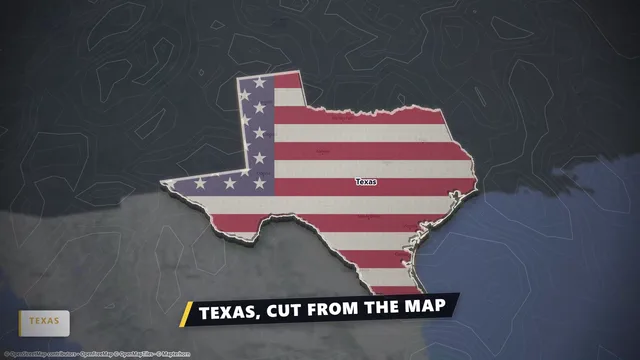
The sample on this page, Texas Boolean Cutout, is a shot that is hard to make in a simple map tool: one state lifts out of the map through a hole-cutout mask, a flag fills its shape and the camera moves around it in 3D. In DocuClip Studio the cutout, the fill and the lift are separate items on the timeline, so you can swap Texas for any other region, change the flag or the texture, and re-time the lift to your narration.
On DocuClip’s plans, hole-cutout masks come with Studio Pro, flag and texture fills with Studio Pro and 3D country prisms with Studio Pro; the sample is set up for 4K, which is Studio Pro.
Where the two differ
Mapimator costs less at the entry level, includes client work in its Pro licence and lists real driving route data. DocuClip Studio is broader: besides maps it has newspaper and dossier zooms, red-string evidence boards, chat dramatizations and chart races, all on one timeline with one sound design. Its maps also carry the borders of ten eras, from 2000 BC to the Cold War and today, which matters for history channels and less for travel videos.
The export models differ too. Mapimator’s plans come with monthly export allowances and AI Director credits; DocuClip’s paid plans have no export count, and their prompt bar has no credit balance.
Licences
Mapimator’s free plan is for personal, non-commercial use, and its paid plans are commercial. DocuClip’s Creator licence covers one creator’s own monetised channels; for client, freelance and agency delivery you need Studio Pro or Founding 50. If you mainly make map clips for clients on a small budget, check that difference before you choose.
Quality and length
Mapimator Pro lists exports up to 4K at 60 fps. DocuClip Creator exports 1080p Full HD at up to 60 fps with clips up to 60 seconds; Studio Pro exports 4K at 60 fps and up to 10 minutes, streamed to disk, plus transparent alpha, batch NLE packs, smart reframe for 16:9 and 9:16, and After Effects .jsx bundles.
Trying both
Both products have a free way in. Mapimator’s free plan gives you one watermarked 480p export a month. DocuClip’s Free Explorer exports no files, but opens all 10 sample projects and every engine in a watermarked 540p preview at 24 fps, with 3 custom AI prompts, so you can test a whole scene before paying. Globe scenes are shown flat in that preview.
How it compares
| Feature | DocuClip Studio | Mapimator |
|---|---|---|
| Where it runs | In the browser; frames rendered on your own computer | In the browser |
| AI | A prompt bar drafts the route, camera and timing; no credit balance on paid plans | AI Director: map animations from text prompts, with monthly credits |
| Free plan | Free Explorer: a free account (Google or e-mail), no card; every sample and engine in a watermarked 540p preview at 24 fps, globe scenes shown flat, 3 custom AI prompts; no file exports | Free: 1 export a month at 480p and 30 fps, 3 one-time AI Director credits, watermark, personal non-commercial use |
| Entry paid plan | Creator: $19 a month or $149 a year; unlimited 1080p exports at up to 60 fps | Pro: $12 a month; 100 exports a month up to 4K at 60 fps, 50 AI Director credits a month |
| Top plan | Studio Pro: $49 a month or $299 a year; 4K at 60 fps, up to 10 minutes | Agency and Enterprise plans: see its pricing page |
| Routes | Great-circle, sea and multi-leg routes; your own GPX, KML or GeoJSON (Studio Pro) | Routes, with real driving route data on Pro |
| Historical borders | Ten built-in eras from 2000 BC to today | Not listed on its pricing page |
| Cutouts and fills | Hole-cutout masks, flag and texture fills, 3D country prisms | Not listed on its pricing page |
| Other documentary shots | Newspapers and dossiers, evidence boards, chat dramatizations, chart races | Not listed on its pricing page |
| Commercial licence | Creator: your own monetised channels. Studio Pro: client and agency work too | Pro: monetised YouTube, social and client work. Enterprise: a TV and broadcast licence |
Last reviewed November 2026. This comparison describes how each product works and is not based on hands-on benchmarks. Competitor prices as listed on their sites on 19 November 2026; they may change. Mapimator’s yearly, Agency and Enterprise prices are on its pricing page. Sources: mapimator.com/pricing. Prices of DocuClip Studio are in US dollars, before any sales tax or VAT. Features change too, so check the vendor’s own site before you decide. Product names belong to their owners; DocuClip Studio is not affiliated with them.
When another tool is better. Mapimator is the better choice for a low monthly price, 4K at 60 fps on its entry paid plan, real driving routes and a licence that covers client work from that plan. If all you need are map clips, it may be all you need.
Questions
- Is DocuClip Studio cheaper than Mapimator?
- Not at the entry level: Mapimator’s Pro plan already includes 4K and client work, and it costs less a month than DocuClip Creator. DocuClip costs more because it also includes newspaper, evidence-board, chat and chart engines, historical borders and, on Studio Pro, transparent exports and editor packs.
- Can I make a state or country cutout like the Texas sample?
- Yes. Pick the region, add a hole-cutout mask and a flag or texture fill, and lift it with the camera; each part is a timeline item you can re-time. Cutout masks come with Studio Pro.
- Does DocuClip Studio limit the number of exports?
- No. Paid plans have no monthly export count. During the first 14 days of a new subscription, exports are paced at up to 40 new projects a day; after that the full plan applies.
- Can I try it free?
- Yes. The Free Explorer is a free account (Google or e-mail) with no card. It opens all 10 sample projects and every engine in a watermarked 540p preview at 24 fps, with globe scenes shown flat, and includes 3 custom AI prompts; it exports no files. Clean exports start with Creator at $19 a month (1080p at up to 60 fps, clips up to 60 seconds); 4K, the 3D Globe and exports up to 10 minutes come with Studio Pro.
Free to explore, paid to export
- Free Explorer ($0): a free account (Google or e-mail), no card. Every sample and engine in a watermarked 540p preview at 24 fps (globe scenes are shown flat), 3 custom AI prompts and the pre-rendered sample NLE pack; no file exports.
- Creator ($19 a month or $149 a year): unlimited clean 1080p exports at up to 60 fps, clips up to 60 seconds, for your own channels.
- Studio Pro ($49 a month or $299 a year): 4K at 60 fps, exports up to 10 minutes, the 3D Globe, transparent alpha, batch NLE packs, smart reframe and After Effects .jsx bundles, for client work too.
⚡ Customize This Sample Free in Studio (1-Click Google Sign-In) → Compare the plans