DocuClip Studio › Script to B-roll
Browser tool
Script to B-roll: a scene for every cue in your narration
A documentary script is full of cues: a voyage, a headline, a number that doubles. Paste the script and Batch Studio spots them, in English, Arabic (any dialect, even written in Latin letters), German and more, typos included, and proposes a map, newspaper or chart scene for each, timed to your reading speed.
⚡ Customize This Sample Free in Studio (1-Click Google Sign-In) →
Opens the Panama Canal Blueprint sample in the studio after a free sign-in (Google or e-mail, no card).
How cue spotting works
Batch Studio reads your script line by line and looks for things that can be shown: places and routes, years and dates, quotes and headlines, figures and changes in figures. Each cue becomes a proposed scene with an engine (map, newspaper or chart), a length based on your reading speed and the words that triggered it. You review the list, change an engine or a length, delete what you do not need and keep the rest.
The Panama sample
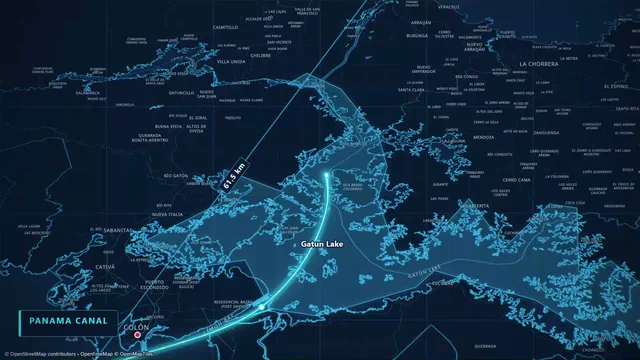
The sample on this page, Panama Canal Blueprint, is the kind of scene a cue like “the canal cut weeks off the voyage” turns into: a cyan blueprint schematic of the canal with CAD-style dimension callouts. It is also set up for dual 16:9 + 9:16 smart reframe, so the same scene exports for a YouTube timeline and a vertical Short. Open it to see how the blueprint, the callouts and the camera are layered.
Languages and messy scripts
Scripts are rarely clean. The spotter reads English, Arabic in Modern Standard and the main dialects (including Franco-Arab written in Latin letters), German and more, and it tolerates typos and spoken phrasing. Paste plain text or an .srt subtitle file, and keep your own wording: the spotter does not rewrite your script.
From cues to a timeline
On Studio Pro, Batch Studio exports every clip in one run and writes a timeline pack for your editor: Premiere XML, Final Cut Pro FCPXML (which DaVinci Resolve also imports) or a CapCut draft, with each clip placed at its cue and one-second dissolve handles. Creator returns the first 2 cues of a script, and so does the Free Explorer, where each script counts as one of its 3 custom AI prompts, so you can see how it works before you need the whole batch.
What stays private
The script is sent to our server to find the cues and processed in memory; the text itself is not stored. When a language model helps read a line, its answer is kept for 30 days under a one-way hash of the text, so that the same line is answered without asking the model again. On paid plans a keyed one-way hash of the script is kept to recognise refund abuse, and it cannot be turned back into the text. Images, footage and the finished clips never leave your computer.
When stock footage is better
Script-to-B-Roll makes maps, documents and charts. It does not find footage of people, cities or nature, and it does not generate any. For those shots a stock library or your own camera is the right source; use the proposed scenes for everything that shows a place, a date, a quote or a number.
How it compares
| Feature | DocuClip Studio | Stock footage search | Making each scene by hand |
|---|---|---|---|
| From script to shots | Automatic cue spotting, then one scene per cue | You search for every cue yourself | You build every scene yourself |
| Fits your story | Your places, dates and numbers | Whatever footage exists | Exactly, given time |
| Licensing | A commercial licence on paid plans; client and agency work on Studio Pro | Per clip or per subscription | Depends on your tools |
| Into your editor | Timeline packs (Studio Pro) and MP4 files | Downloaded clips | Rendered files |
Last reviewed November 2026. This comparison describes how each product works, not its price, and is not based on hands-on benchmarks. Features change, so check the vendor’s own site before you decide. Product names belong to their owners; DocuClip Studio is not affiliated with them.
When another tool is better. Stock footage is the better choice for real-world scenes (people, cities, nature). Building by hand is the better choice for a few signature shots that need a unique design.
Questions
- Which languages does the spotter understand?
- English, Arabic in Modern Standard and the main dialects (including Franco-Arab written in Latin letters), German and more, with typos tolerated.
- How long is each clip?
- Choose a fixed length or let the reading speed decide. Clips run up to 60 seconds on Creator and up to 10 minutes on Studio Pro.
- What is in a timeline pack?
- The clips plus a project file that places each clip at its cue, with one-second dissolve handles: Premiere XML, Final Cut Pro FCPXML (which DaVinci Resolve also imports) or a CapCut draft. Timeline packs come with Studio Pro.
- Is my script stored?
- No. The text is processed in memory to find the cues; when a language model helps, only its answer is cached for 30 days under a one-way hash of the text. On paid plans a keyed one-way hash of the script is kept to recognise refund abuse; it cannot be turned back into the text (see the privacy policy).
Free to explore, paid to export
- Free Explorer ($0): a free account (Google or e-mail), no card. Every sample and engine in a watermarked 540p preview at 24 fps (globe scenes are shown flat), 3 custom AI prompts and the pre-rendered sample NLE pack; no file exports.
- Creator ($19 a month or $149 a year): unlimited clean 1080p exports at up to 60 fps, clips up to 60 seconds, for your own channels.
- Studio Pro ($49 a month or $299 a year): 4K at 60 fps, exports up to 10 minutes, the 3D Globe, transparent alpha, batch NLE packs, smart reframe and After Effects .jsx bundles, for client work too.
⚡ Customize This Sample Free in Studio (1-Click Google Sign-In) → Compare the plans