DocuClip Studio › Map animation without After Effects
Browser tool
Map animation without After Effects
A route across a map, a border that spreads, a camera that drops from orbit to a strait: these usually mean After Effects, a map plugin and an evening of keyframes. In DocuClip Studio you describe the scene, adjust it on a timeline and export the MP4, all in the browser.
⚡ Customize This Sample Free in Studio (1-Click Google Sign-In) →
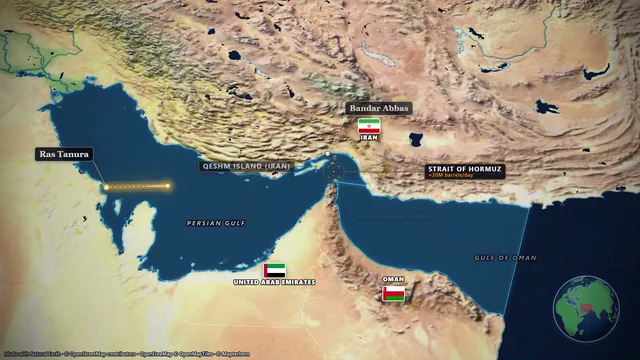
Opens the Hormuz Chokepoint sample in the studio after a free sign-in (Google or e-mail, no card).
The usual way, and why it is slow
In After Effects a map animation is a composition: you import map tiles or a plugin layer, set position, scale and rotation keyframes for the camera, mask the route so that it draws on, animate each label in and out, and render. It is flexible, and it is slow when you need a dozen map shots for one video. Every change to the route or to the timing means touching keyframes again, and a new episode means building the same thing from the start.
The browser way
DocuClip Studio treats a map shot as a scene whose parts already know how to move. Type “Tankers from Hormuz to Bab el-Mandeb (8s)” or open a sample, and the route, the camera path and the timings are drafted. The route draws itself, labels pop in when the camera reaches them, and a distance counter can run alongside. Each part is an item on the timeline: drag it to the moment in your narration where it belongs, stretch it to the length you want, or keep a camera position as a keyframe if you want exact control.
Step by step
Open the Hormuz Chokepoint sample from the button above and sign in with Google or an e-mail code. Change the stops in the scene panel or type a new route as a sentence. Pick a look: a parchment atlas, a dark geopolitics map, a clean minimal style or a blueprint schematic. Choose an era if your story is historical; the borders of ten eras are built in, from 2000 BC to the Cold War and today. Play it back in the preview, then export an MP4 in 16:9 for YouTube or 9:16 for Shorts and Reels on a paid plan.
What the browser can and cannot do
Rendering happens on your own computer with the browser’s video encoder, frame by frame, so the motion is identical on a slow laptop and on a workstation; the slow one just takes longer. Nothing you import is uploaded. What you do not get is After Effects’ open-ended compositing: if you need to mask the map against live footage or drive it with expressions, export a transparent overlay or an After Effects .jsx bundle on Studio Pro and finish the shot there.
Exports and plans
Creator exports clean 1080p Full HD video at up to 60 fps, clips up to 60 seconds. Studio Pro exports 4K at 60 fps, up to 10 minutes, and adds the 3D Globe view used at the start of this sample, transparent alpha, batch NLE packs and dual 16:9 + 9:16 smart reframe. The Free Explorer, a free account, previews the sample and every engine under a watermark at 540p and 24 fps, with the globe opening shown flat, and exports no files.
Map data and credits
The maps use OpenStreetMap data served by OpenFreeMap and OpenMapTiles, Natural Earth borders and openly licensed imagery. There is no map API key to set up and no usage bill. Keep the small data credit in the frame, or credit OpenStreetMap contributors, OpenMapTiles and OpenFreeMap in your video description.
How it compares
| Feature | DocuClip Studio | After Effects (by hand or with plugins) | Google Earth Studio |
|---|---|---|---|
| Where it runs | Any modern browser | Desktop app (Windows, macOS) | Google Chrome on a desktop |
| Account | A free account (Google or e-mail) to open and preview the samples; a paid plan to export | An Adobe subscription | A Google account and an access request |
| Look | Stylised documentary maps, historical borders, satellite relief | Whatever you design | Photorealistic Google Earth imagery and 3D buildings |
| Routes and borders | Built in, from place names and eras | Built by hand or with a plugin | Camera animation; routes and labels are usually added afterwards in an editor |
| Output | A finished MP4 with sound design | Any format After Effects renders | An image sequence you assemble in an editor |
| Learning curve | Minutes | Days to weeks | An hour or two |
Last reviewed November 2026. This comparison describes how each product works, not its price, and is not based on hands-on benchmarks. Features change, so check the vendor’s own site before you decide. Product names belong to their owners; DocuClip Studio is not affiliated with them.
When another tool is better. After Effects is the better choice for fully custom motion design and compositing. Google Earth Studio is the better choice when you need photorealistic 3D cities and terrain from Google Earth and can follow Google’s attribution and licence terms.
Questions
- Can I animate an old map, not a modern one?
- Yes. Pick an era such as 117 AD, 1492, 1815, 1914, 1942 or 1989 and the borders of that time are drawn, with an optional conquest sweep or border trace. The conflict eras from 1815 to 1989 and their arrows are drawn on Creator and Studio Pro.
- Will it work for YouTube Shorts and TikTok?
- Yes. Switch the frame to 9:16 and turn on the safe-zone guides so that labels stay clear of the platform buttons.
- Does my project get uploaded?
- No. The animation is drawn and encoded inside your browser. Only the text of a prompt you type is sent to the server to plan the shot, and it is not stored.
- Is it free?
- Opening, editing and previewing are: a free Free Explorer account previews every sample and engine under a watermark, at 540p and 24 fps. Exporting a file needs Creator ($19 a month) or Studio Pro ($49 a month).
Free to explore, paid to export
- Free Explorer ($0): a free account (Google or e-mail), no card. Every sample and engine in a watermarked 540p preview at 24 fps (globe scenes are shown flat), 3 custom AI prompts and the pre-rendered sample NLE pack; no file exports.
- Creator ($19 a month or $149 a year): unlimited clean 1080p exports at up to 60 fps, clips up to 60 seconds, for your own channels.
- Studio Pro ($49 a month or $299 a year): 4K at 60 fps, exports up to 10 minutes, the 3D Globe, transparent alpha, batch NLE packs, smart reframe and After Effects .jsx bundles, for client work too.
⚡ Customize This Sample Free in Studio (1-Click Google Sign-In) → Compare the plans