DocuClip Studio › Newspaper highlight effect
Browser tool
The newspaper highlight effect, made in your browser
The documentary shot where a camera glides over an old front page and a highlighter picks out one sentence. Paste the text, or upload a screenshot of a page you have the right to show, choose the phrases, and DocuClip Studio animates the marker, the paper and the camera.
⚡ Customize This Sample Free in Studio (1-Click Google Sign-In) →
Opens the 1973 Oil Embargo Dossier sample in the studio after a free sign-in (Google or e-mail, no card).
Why the shot works
A highlighted line on a printed page tells the viewer two things at once: this was really written down, and this is the part that matters. That is why documentaries return to it so often. The effect only works if the page looks like paper rather than a flat screenshot, the camera moves with intent, and the marker reaches each word at the moment the narrator says it.
How DocuClip builds it
You paste a headline and an article, and the page is typeset live in one of several layouts: a vintage broadsheet, a modern journal or a typewritten case file. Paper grain, ink bleed and aged edges come with the layout. Choose up to five phrases and the marker sweeps them in order, in neon yellow, crimson archival ink or a gold glow, while a 3D camera pushes in, keeps both margins in frame and racks focus. Photos dropped onto the page are screened into newsprint dots to match.
If you already have the real page, switch to screenshot mode, upload the image and drag boxes over the lines to highlight. The image never leaves your browser.
The dossier sample
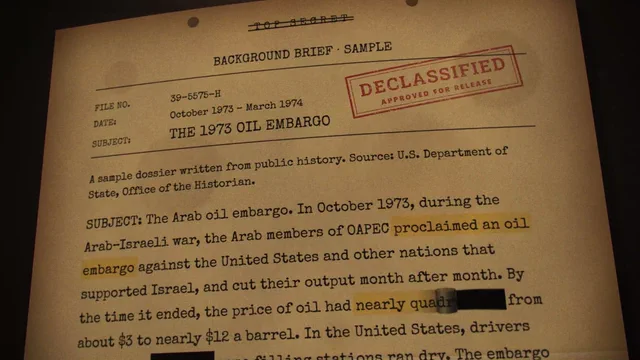
The sample on this page is the 1973 Oil Embargo Dossier: a declassified-style document with redaction bars, stamps and a highlight zoom. It shows the darker cousin of the newspaper shot, used for intelligence stories, court cases and leaks. Dossiers and breaking-wire cards come with Studio Pro. Open the sample, replace the text with your own, move the redactions and the stamps, and re-time the zoom to your narration.
Right to left, and other details
Arabic and Hebrew text is typeset and highlighted from right to left automatically, and the marker sweeps in reading order. The built-in mastheads are fictional, so you can use them freely; if you upload a real page, make sure you have the right to show it. The typewriter and dossier styles use the Courier fonts already on every computer.
Export
The shot exports as MP4 in 16:9, 9:16 or 1:1 on a paid plan. Creator exports 1080p at up to 60 fps, clips up to 60 seconds; Studio Pro exports 4K at 60 fps and transparent WebM, so the page can float over your own footage. Rendering is frame by frame on your computer, so fine print stays sharp. The free Free Explorer preview is watermarked and capped at 540p, which is enough to check the layout and the timing.
Versus doing it by hand
In a video editor you can fake the effect with a scan, a rectangle mask and a scale keyframe. It works for one shot. For a series of quotes, with a camera that keeps the margins in frame and a sweep timed to each word, a dedicated engine saves the evening and keeps every quote in the series looking the same.
How it compares
| Feature | DocuClip Studio | After Effects template | Masking by hand in a video editor |
|---|---|---|---|
| Setup | Paste text or upload a page image | Replace the template’s text and images in After Effects | Import a scan and keyframe a mask |
| Marker sweep | Automatic, timed to the words | Built into the template | Animated by hand |
| 3D camera move | Built in, keeps both margins in frame | Built into the template | Pan and zoom only |
| Right-to-left text | Yes (Arabic and Hebrew) | Depends on the template | Depends on your editor |
| Cost | Free to explore; paid plans to export | An After Effects subscription plus the template | Your editor |
Last reviewed November 2026. This comparison describes how each product works, not its price, and is not based on hands-on benchmarks. Features change, so check the vendor’s own site before you decide. Product names belong to their owners; DocuClip Studio is not affiliated with them.
When another tool is better. An After Effects template is the better choice when you need a very specific designed look and already have After Effects. Masking by hand is fine for a single quick shot on a real archive scan.
Questions
- Can I use a real newspaper article?
- You can upload any page image or paste any text, but make sure you have the right to show it. The built-in mastheads are fictional so that they can be used freely.
- Does it support Arabic?
- Yes. Arabic pages are laid out right to left, and the marker sweeps in reading order.
- How long can the shot be?
- Up to 60 seconds on Creator and up to 10 minutes on Studio Pro.
- Can I change the paper colour and fonts?
- Yes. Pick a layout and a look kit; the typewriter and dossier styles use the Courier fonts already on every computer.
Free to explore, paid to export
- Free Explorer ($0): a free account (Google or e-mail), no card. Every sample and engine in a watermarked 540p preview at 24 fps (globe scenes are shown flat), 3 custom AI prompts and the pre-rendered sample NLE pack; no file exports.
- Creator ($19 a month or $149 a year): unlimited clean 1080p exports at up to 60 fps, clips up to 60 seconds, for your own channels.
- Studio Pro ($49 a month or $299 a year): 4K at 60 fps, exports up to 10 minutes, the 3D Globe, transparent alpha, batch NLE packs, smart reframe and After Effects .jsx bundles, for client work too.
⚡ Customize This Sample Free in Studio (1-Click Google Sign-In) → Compare the plans