DocuClip Studio › Alternatives › GEOlayers alternative
Comparison
A GEOlayers alternative for documentary maps, headlines and charts
GEOlayers comes in two forms: GEOlayers 3, a long-standing map extension for Adobe After Effects, and GEOlayers.app, a map animator that runs in the browser. DocuClip Studio covers the same documentary map ground in the browser and adds four more engines for the shots around the map.
⚡ Customize This Sample Free in Studio (1-Click Google Sign-In) →
Opens the Hormuz Chokepoint sample in the studio after a free sign-in (Google or e-mail, no card).
Who this comparison is for
You make videos where a map carries part of the story: a shipping route, a border that moves, a strait that matters. You have probably tried GEOlayers, or you are deciding between its two versions. This page sets out what each product does, where each one is the better buy, and what changes if you work in DocuClip Studio instead. It is written by the DocuClip team, so read it as a vendor’s comparison: the facts about GEOlayers come from its own pages, dated below, and we say plainly where it wins.
The two GEOlayers products in one paragraph
GEOlayers 3 lives inside After Effects. It pulls map tiles from many providers into a composition, so the map sits next to your footage, expressions and effects, and you animate it the way you animate anything else in After Effects. Its styled map imagery, labels and 3D buildings come with a map data subscription after the first two weeks. GEOlayers.app is a separate product that runs in the browser, with an item-based timeline, basemaps and styles, voiceover recording and geodata import; its Studio plan adds 3D terrain, a globe projection and clips of up to ten minutes.
What the same shot looks like in DocuClip Studio
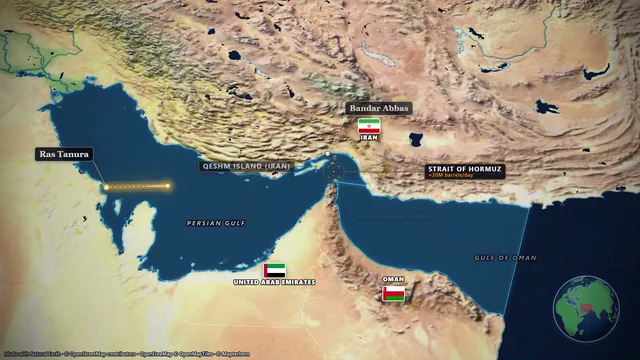
Open the sample above and you get the Hormuz Chokepoint project: the camera starts on the globe, drops towards the Gulf and follows tankers through the strait while labels and a distance counter appear on cue. Every route, label, highlight and camera move is an item on the timeline that you drag to its moment and stretch to its length. There are no keyframes to set by hand, although you can keep any camera position as one.
Type a sentence such as “Tankers from Hormuz to Bab el-Mandeb (8s)” into the prompt bar and the route, the camera and the timing are drafted for you; then you change what you do not like. The borders of ten eras are built in, from 2000 BC to the Cold War and today, so a map of 1914 or 1942 needs no imported data.
Where the plans differ
Creator exports clean 1080p video at up to 60 fps, clips of up to 60 seconds, for your own channels. The 3D Globe view, 4K at 60 fps and exports of up to 10 minutes are part of Studio Pro, together with transparent exports, batch timeline packs for Premiere, Final Cut and CapCut, and After Effects .jsx bundles. If your work is mostly long map sequences, compare GEOlayers.app Studio with Studio Pro, not with Creator.
What you give up by leaving After Effects
If you already live in After Effects, GEOlayers 3 keeps everything in one composition: you can mask the map against footage, drive it with expressions and grade it with the rest of the shot. DocuClip renders finished clips instead. You can bring them into After Effects as an MP4, a transparent WebM or a PNG sequence, and Studio Pro writes an After Effects .jsx bundle, but the map is no longer a live layer that you re-time inside your composition.
What you gain
The shots around the map are in the same studio. A newspaper page with a marker sweep, a declassified-style dossier, a red-string evidence board, a chat dramatization or a bar race share the same timeline, export settings and sound design, so a whole segment can come out of one tab. Rendering happens on your own computer, frame by frame, so nothing you bring in is uploaded and a slower machine only takes longer.
How to try it without paying
Create a free Free Explorer account with Google or an e-mail code (no card), open the Hormuz sample and change the route, the labels and the era. The preview plays every engine and effect under a watermark, at 540p and 24 fps, with the globe opening shown flat, and you get 3 custom AI prompts to draft scenes of your own. You can also download the pre-rendered sample NLE pack to see how the files sit on your own timeline. Exporting a clip of your own starts with a paid plan.
How it compares
| Feature | DocuClip Studio | GEOlayers.app (browser) | GEOlayers 3 (After Effects extension) |
|---|---|---|---|
| Where it runs | In the browser (Chrome, Edge, Safari, Firefox); every frame is rendered on your own computer | In the browser | Inside Adobe After Effects (CC 2015 or later) on Windows or macOS |
| Price | Creator $19 a month or $149 a year; Studio Pro $49 a month or $299 a year; Founding 50: Studio Pro for $149 a year (50 seats) | Pro $25 a month and Studio $66.67 a month, both billed annually; no monthly billing listed | A GEOlayers 3 licence from aescripts.com plus an After Effects subscription; after the first two weeks, a map data subscription for styled map imagery, labels and 3D buildings |
| Free plan | Free Explorer: a free account (Google or e-mail), no card; every sample and engine in a watermarked 540p preview at 24 fps, globe scenes shown flat, 3 custom AI prompts; no file exports | Free: 1280 × 1280 px, 10-second clips, 5 projects, non-commercial use | A trial version |
| Largest export | Studio Pro: 4K (3840 × 2160) at 60 fps, up to 10 minutes. Creator: 1080p at up to 60 fps, clips up to 60 s | Pro: 2048 × 2048 px, 1-minute clips. Studio: 4096 × 4096 px, 10-minute clips | Whatever After Effects renders |
| Multi-zoom vector maps and a 3D globe | Multi-zoom vector maps on both paid plans; the 3D Globe view on Studio Pro | Basemaps and map styles; 3D terrain and globe projection on Studio | Many tile providers and 3D terrain; styled map imagery needs the map data subscription |
| Keyframe-free item timeline | Yes, on every plan; camera keyframes are there when you want them | Yes: an item-based timeline without keyframes | After Effects keyframes and expressions |
| Flag and texture fills, cutout masks | Flag and texture land fills (Studio Pro) and hole-cutout masks (Studio Pro) | Feature highlighting; flag fills and cutout masks are not listed on its site | Built by hand with After Effects masks and effects |
| Voiceover | Record with your microphone in the browser, with waveform sync (Studio Pro) | Yes: record voiceovers | Recorded elsewhere and added in After Effects |
| Transparent and image-sequence exports | Studio Pro: transparent WebM (VP9 + alpha), a lossless 4K PNG sequence and green-screen chroma key | MP4, and a lossless 4K image sequence | Any format After Effects renders, including alpha |
| Your own map data | .geojson, .gpx, .kml and .csv import (Studio Pro) | Imports geodata | Imports your own data (for example GeoJSON) |
| Historical borders | 10 built-in eras from 2000 BC to the Cold War and today, with animated reveals; conflict eras and arrows on paid plans | Not listed on its site | Imported as your own data |
| Newspapers, evidence boards and charts | Yes: newspaper and dossier zooms, red-string evidence boards, chat dramatizations and chart races | Not listed on its site | Separate After Effects templates |
| Licence | Creator: one creator’s own monetised channels. Studio Pro and Founding 50: client, freelance and agency work as well | Free: non-commercial. Pro: commercial use. Studio: commercial use and B2B | The aescripts.com licence; commercial use of its map data needs the data subscription and an attribution |
Last reviewed November 2026. This comparison describes how each product works and is not based on hands-on benchmarks. Competitor prices as listed on their sites on 19 November 2026; they may change. At those list prices a year of Studio Pro ($299) costs 63% less than a year of GEOlayers.app Studio (about $800), and a Founding 50 seat ($149 a year) 81% less. Sources: geolayers.app/pricing, aescripts.com/geolayers. Prices of DocuClip Studio are in US dollars, before any sales tax or VAT. Features change too, so check the vendor’s own site before you decide. Product names belong to their owners; DocuClip Studio is not affiliated with them.
When another tool is better. GEOlayers 3 is the better choice when you already work in After Effects and want the map as a live layer that you composite with footage, effects and expressions. GEOlayers.app is the better choice for long map videos on their own, square or very large frames (up to 4096 × 4096 px) and organisation-wide template projects for a team.
What DocuClip Studio adds
- Four more engines. Newspapers and dossiers, a 3D red-string evidence board, digital-forensics chat and post sequences, and chart races share the map’s timeline, export settings and sound design.
- AI Script-to-B-Roll in many languages. Paste a narration in English, Arabic (Modern Standard, the main dialects and Franco-Arab written in Latin letters), German and more. Every place, date and figure becomes a map, newspaper or chart scene timed to your reading speed; Studio Pro runs the whole script as one batch and writes the timeline pack.
- Historical borders. Ten eras from 2000 BC to the Cold War and today are built in, with animated reveals, so a historical map needs no imported data.
- The price. Studio Pro costs $299 a year, or $49 a month with no yearly commitment, and Founding 50 is Studio Pro for $149 a year while its 50 seats last. Opening and editing the samples is free with a Free Explorer account.
Questions
- Is DocuClip Studio an After Effects plugin?
- No. It is a web app: the map, the camera and the export all run in your browser. You can bring the result into any editor, including After Effects, as an MP4, and on Studio Pro as a transparent overlay, a PNG sequence, a timeline pack or an After Effects .jsx bundle.
- Does DocuClip Studio have an item timeline like GEOlayers.app?
- Yes. Routes, labels, highlights and camera moves sit on the timeline as items that you drag and stretch, with no keyframes to set; press K when you do want to keep a camera position as a keyframe.
- Do I need a Mapbox or Google Maps key?
- No. The maps use OpenStreetMap data served by OpenFreeMap, Natural Earth borders and openly licensed imagery. There is no key to set up and no usage bill.
- Can I try it without paying?
- Yes. The Free Explorer is a free account (Google or e-mail) with no card. It opens all 10 sample projects and every engine in a watermarked 540p preview at 24 fps, with globe scenes shown flat, and includes 3 custom AI prompts; it exports no files. Clean exports start with Creator at $19 a month (1080p at up to 60 fps, clips up to 60 seconds); 4K, the 3D Globe and exports up to 10 minutes come with Studio Pro.
- What does it cost?
- Creator is $19 a month or $149 a year; Studio Pro is $49 a month or $299 a year; Founding 50 is Studio Pro for $149 a year while its 50 seats last. Prices are in US dollars and you can cancel any time.
Free to explore, paid to export
- Free Explorer ($0): a free account (Google or e-mail), no card. Every sample and engine in a watermarked 540p preview at 24 fps (globe scenes are shown flat), 3 custom AI prompts and the pre-rendered sample NLE pack; no file exports.
- Creator ($19 a month or $149 a year): unlimited clean 1080p exports at up to 60 fps, clips up to 60 seconds, for your own channels.
- Studio Pro ($49 a month or $299 a year): 4K at 60 fps, exports up to 10 minutes, the 3D Globe, transparent alpha, batch NLE packs, smart reframe and After Effects .jsx bundles, for client work too.
⚡ Customize This Sample Free in Studio (1-Click Google Sign-In) → Compare the plans