DocuClip Studio › Alternatives
Comparison
DocuClip Studio alternatives, compared honestly
DocuClip Studio is a browser studio for documentary motion graphics: maps and globe flyovers, newspaper and dossier zooms, evidence boards, chat dramatizations and chart races. It is not the right tool for everything. This page lists the usual alternatives, what each is best at, what each costs as listed on its own site, and where to read a detailed comparison.
⚡ Customize This Sample Free in Studio (1-Click Google Sign-In) →
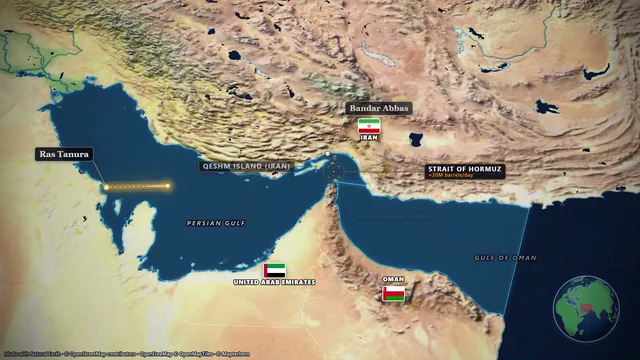
Opens the Hormuz Chokepoint sample in the studio after a free sign-in (Google or e-mail, no card).
How to choose
Start from the shot, not the tool. If the shot is a photoreal flyover of a real city, look at Google Earth Studio. If it is a map clip for a travel video, look at Animaps, Mapimator or Maptake. If the map has to sit inside an After Effects composition, look at GEOlayers 3. If the chart has to be interactive on a web page, look at Flourish. If it is freeform motion design with generated imagery, look at Hera. DocuClip Studio is for the documentary segment as a whole: the map, the headline, the document, the evidence and the data, made in one place and cut to your narration.
What the map tools have in common
GEOlayers.app, Maptake, Animaps and Mapimator all run in the browser and all start a map shot from a few words or a few clicks. They differ in look (satellite imagery against stylised maps), in pricing model (credits against flat plans), in the longest clip they export and in the licence each plan gives you. The table below sets those out with the prices each vendor listed on its own site on the date shown, and each name links to a detailed page.
Where DocuClip is different
DocuClip puts five documentary engines on one timeline: maps and the 3D Globe, newspapers and dossiers, charts and races, a 3D evidence board, and digital-forensics chat and post sequences. Its maps carry the borders of ten eras. Everything is rendered on your own computer, so nothing you import is uploaded, and paid plans are flat subscriptions with no credits and no export count.
It is also not the cheapest. Animaps and Mapimator cost less at the entry level, and Mapimator’s entry plan includes client work. DocuClip’s Creator licence covers your own channels; client work needs Studio Pro.
If you are coming from After Effects
After Effects can make any of these shots, with enough time and the right plugins or templates. The reason to use a dedicated tool is speed and consistency: a map, a headline or a race that takes an evening to keyframe can take minutes in a tool built for it. DocuClip exports transparent WebM, PNG sequences and After Effects .jsx bundles on Studio Pro, so it can feed an After Effects workflow rather than replace it.
Stock footage and B-roll
Stock libraries are the other common alternative. They are the better source for real-world scenes such as people, cities and nature, and they need no design work at all. What they cannot give you is a shot that shows your places, your dates and your numbers. DocuClip’s Script-to-B-Roll reads a narration script and proposes a map, newspaper or chart scene for each cue, which covers the shots stock footage cannot.
How we compare
Each comparison describes how the product works, from its own website, on the date shown. We do not run hands-on benchmarks, we do not use ratings or reviews, and we link the pages we read. Product names belong to their owners, and DocuClip Studio is not affiliated with any of them. If you spot a fact that has changed, write to us and we will correct the page.
Try before you choose
Every tool on this list has some free way in. DocuClip’s is the Free Explorer: a free account (Google or e-mail) with no card that opens all 10 sample projects and every engine in a watermarked 540p preview at 24 fps, with globe scenes shown flat and 3 custom AI prompts. It exports no files; use it to judge each engine on a real sample, and subscribe when a project is ready to export.
The alternatives at a glance
| Tool | Best for | Runs in | Price (as listed) | Compared on |
|---|---|---|---|---|
| DocuClip Studio | Documentary maps, newspaper and dossier zooms, evidence boards, chat dramatizations and chart races on one timeline | The browser; renders on your device | Free Explorer $0 (preview only); Creator $19/mo or $149/yr; Studio Pro $49/mo or $299/yr; Founding 50: Studio Pro for $149/yr | This site |
| GEOlayers.app | Map animation with an item timeline, long clips and team templates | The browser | Free (non-commercial); Pro $25/mo and Studio $66.67/mo, billed annually | GEOlayers alternative |
| GEOlayers 3 | Map animation inside After Effects, with full compositing control | Adobe After Effects | A licence from aescripts.com, plus After Effects and, after two weeks, a map data subscription | GEOlayers alternative |
| Maptake | Cinematic satellite map videos drafted by an AI agent | The browser | Free; Pro $40/mo or $30/mo billed yearly; Studio $80/mo or $66.67/mo billed yearly | Maptake alternative |
| Animaps | Route and globe map videos from one sentence | The browser | Free (12 credits a month); Starter $9.90/mo; Pro $19.90/mo | Animaps alternative |
| Mapimator | Map animations with an AI Director, 4K at 60 fps from its entry plan | The browser | Free (1 export a month at 480p); Pro $12/mo; other plans on its site | Mapimator alternative |
| Hera | Freeform AI motion design and generated imagery on one canvas | The browser | Credit-based plans; no prices on its public site | Hera alternative |
| Google Earth Studio | Photorealistic Google Earth flyovers | Google Chrome | No price listed; access on request | Google Earth Studio alternative |
| Flourish | Interactive charts and stories on the web | The browser | See its pricing page | Flourish bar chart race alternative |
| After Effects | Fully custom motion design and compositing | Desktop app | An Adobe subscription | Map animation without After Effects |
| Stock footage | Real-world scenes: people, cities, nature | The browser | Per clip or per subscription | Script to B-roll |
Last reviewed November 2026. This comparison describes how each product works and is not based on hands-on benchmarks. Competitor prices as listed on their sites on 19 November 2026; they may change. Sources: geolayers.app/pricing, aescripts.com/geolayers, maptake.com/pricing, animaps.ai/pricing, mapimator.com/pricing, hera.video, Earth Studio FAQ, flourish.studio/pricing. Prices of DocuClip Studio are in US dollars, before any sales tax or VAT. Features change too, so check the vendor’s own site before you decide. Product names belong to their owners; DocuClip Studio is not affiliated with them.
When another tool is better. Every tool above does something DocuClip Studio does not. Choose by the shot you need; if it is a map, a page, a board, a chat or a chart that tells a documentary story, try DocuClip’s samples first.
What DocuClip Studio adds
- Four more engines. Newspapers and dossiers, a 3D red-string evidence board, digital-forensics chat and post sequences, and chart races share the map’s timeline, export settings and sound design.
- AI Script-to-B-Roll in many languages. Paste a narration in English, Arabic (Modern Standard, the main dialects and Franco-Arab written in Latin letters), German and more. Every place, date and figure becomes a map, newspaper or chart scene timed to your reading speed; Studio Pro runs the whole script as one batch and writes the timeline pack.
- Historical borders. Ten eras from 2000 BC to the Cold War and today are built in, with animated reveals, so a historical map needs no imported data.
- The price. Studio Pro costs $299 a year, or $49 a month with no yearly commitment, and Founding 50 is Studio Pro for $149 a year while its 50 seats last. Opening and editing the samples is free with a Free Explorer account.
Questions
- What is DocuClip Studio?
- A browser-based motion studio for documentary creators with five engines: maps and globe flyovers, newspaper and dossier zooms, chart races, a 3D evidence board and chat and post sequences, exported as MP4 on your own device.
- Which alternative is closest?
- For maps alone: GEOlayers (GEOlayers.app in the browser or GEOlayers 3 in After Effects), Maptake, Animaps and Mapimator. For charts: Flourish. For photoreal Earth flyovers: Google Earth Studio. For freeform AI motion design: Hera.
- Can I use DocuClip with my editor?
- Yes. Export MP4 files for any editor; Studio Pro adds transparent overlays, PNG sequences, batch NLE packs for Premiere, Final Cut and CapCut (DaVinci Resolve imports the Final Cut file) and After Effects .jsx bundles.
- How much does it cost?
- The Free Explorer is a free account with no card: a watermarked preview of every sample and engine, without file exports. Creator is $19 a month or $149 a year, Studio Pro $49 a month or $299 a year, and Founding 50 is Studio Pro for $149 a year (50 seats), all in US dollars. Cancel any time.
Free to explore, paid to export
- Free Explorer ($0): a free account (Google or e-mail), no card. Every sample and engine in a watermarked 540p preview at 24 fps (globe scenes are shown flat), 3 custom AI prompts and the pre-rendered sample NLE pack; no file exports.
- Creator ($19 a month or $149 a year): unlimited clean 1080p exports at up to 60 fps, clips up to 60 seconds, for your own channels.
- Studio Pro ($49 a month or $299 a year): 4K at 60 fps, exports up to 10 minutes, the 3D Globe, transparent alpha, batch NLE packs, smart reframe and After Effects .jsx bundles, for client work too.
⚡ Customize This Sample Free in Studio (1-Click Google Sign-In) → Compare the plans