DocuClip Studio › Editorial quote card video maker
Browser tool
An editorial quote card video maker, with the source on every card
Documentaries quote people, reports and records all the time, and the quote is only as strong as its source. DocuClip Studio’s Editorial Quotes & Citations engine animates the quote on a clean editorial card and always shows where it comes from: the speaker, the publication and the year.
⚡ Customize This Sample Free in Studio (Sign In Free) →
Opens the “Their Finest Hour”, 1940 sample in the studio after a free sign-in (e-mail sign-in, no card).
Four kinds of card
A Speaker Quote Card sets an excerpt in large type with the speaker’s name, the publication or occasion and the year. A Historical Transcript lights up each word as it is said, which suits a recorded speech or a hearing. A Published Report Callout pulls one passage out of a report with its title and publisher. A Search-to-Citation Highlight types a search, then moves to the cited passage and highlights the line that answers it. All four are designed around a visible source line.
The sample
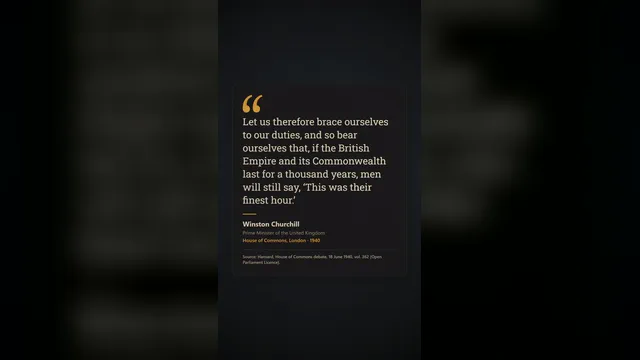
The sample on this page is a Speaker Quote Card built from a well-known historical speech, attributed with the speaker, the occasion and the year under the excerpt. Open it, replace the excerpt with your own, fill in the source, and re-time the reveal so the words land with your narration.
Quote honestly
Keep quotes word for word, and mark any cut with an ellipsis. Name the speaker and the place the words were published or spoken, and give the year. Do not put words in a real person’s mouth, do not combine two quotes into one, and do not present a paraphrase as a quotation. When the wording comes from a translation, say so in the source line. These habits are what make a documentary trustworthy, and the card is designed around them.
Design and readability
The card uses a calm editorial layout: a large quotation mark, generous margins and a type size chosen for phones. Long excerpts are better split into two cards than squeezed into one. In 9:16 the card fills the frame for Shorts and Reels; in 16:9 it can sit beside a map or a press page from the same project, sharing the timeline and the sound design.
Timing to narration
Each card is an item on the timeline. Drag the moment a card appears to the sentence in your voiceover that introduces it, stretch it to give viewers time to read, or let a transcript light its words in step with a recording. Nothing has to be keyframed by hand.
Export and plans
Cards export as MP4 in 16:9, 9:16 or 1:1. Creator exports 1080p at up to 60 fps, clips up to 60 seconds; Studio Pro adds 4K, transparent alpha for laying a card over footage, and dual 16:9 + 9:16 smart reframe. The free Free Explorer previews every card under a watermark and exports no files.
How it compares
| Feature | DocuClip Studio | Title template in a video editor | After Effects template |
|---|---|---|---|
| Source line | Part of every card: speaker or publisher, publication and year | Optional, typed by hand | Depends on the template |
| Card types | Speaker quote, historical transcript, report callout, search-to-citation highlight | A text title | Usually one quote layout |
| Timing | Words and cards timed on the timeline to your narration | Keyframed by hand | Built into the template |
| Formats | 16:9, 9:16 and 1:1 from the same card | One frame per title | Depends on the template |
Last reviewed November 2026. This comparison describes how each product works, not its price, and is not based on hands-on benchmarks. Features change, so check the vendor’s own site before you decide. Product names belong to their owners; DocuClip Studio is not affiliated with them.
When another tool is better. A title in your video editor is the better choice for a single short quote you will show once. An After Effects template is better when you need one very specific designed look across a whole series and already work in After Effects.
Questions
- What goes in the source line?
- The speaker or publisher, the publication or occasion and the year, set under the excerpt on every card. That is what makes it an editorial citation rather than a floating quote.
- Can I quote a translation?
- Yes. Put the original speaker and year in the source line and add that the wording is a translation, with the translator if you know it.
- Does a transcript follow a recording?
- Yes. A Historical Transcript lights each word in turn; time it on the timeline to the recording or to your own voiceover.
- Which plan do I need?
- Opening, editing and a watermarked preview are free with a Free Explorer account. Exports start with Creator; 4K and transparent alpha come with Studio Pro.
Free to explore, paid to export
- Free Explorer ($0): a free account (e-mail sign-in), no card. Every sample and engine in a watermarked 540p preview at 24 fps (globe scenes are shown flat), 3 custom AI prompts and the pre-rendered sample NLE pack; no file exports.
- Creator ($19 a month or $149 a year): watermark-free 1080p exports at up to 60 fps (no export credits; fair use applies), clips up to 60 seconds, for your own channels.
- Studio Pro ($49 a month or $299 a year): 4K at 60 fps, exports up to 10 minutes, the 3D Globe, transparent alpha, batch NLE packs, smart reframe and After Effects .jsx bundles, for client work too.
⚡ Customize This Sample Free in Studio (Sign In Free) → Compare the plans