DocuClip Studio › Alternatives › Hera alternative
Comparison
A Hera alternative for documentary motion graphics
Hera calls itself an AI-native creative canvas: you generate images, design and animate on one canvas, and the motion graphics stay editable. DocuClip Studio is narrower on purpose: five engines for the shots documentary channels need, driven by your places, words and numbers.
⚡ Customize This Sample Free in Studio (1-Click Google Sign-In) →
Opens the Constantinople 1453 sample in the studio after a free sign-in (Google or e-mail, no card).
Two different starting points
Hera starts from a prompt and a canvas. You ask for a motion graphic, it generates one, and you keep editing it there; images can be generated in the same place. That makes it flexible for titles, product promos, social posts and abstract motion design. DocuClip Studio starts from the kind of shot instead: a map with a route, a page with a highlighted line, a wall of evidence, a chat thread or a chart. You pick the engine, give it your facts, and the layout, camera and timing follow rules made for that shot.
Why a documentary needs constrained tools
In a documentary the motion graphic has to be right before it is pretty. A border has to be the border of that year; a bar has to be the size of its number; a quote has to be the words that were printed. DocuClip’s engines are built around that. The map draws the borders of ten eras from data, the chart engine sizes every bar and slice from your values (the donut in the chip-crash sample adds up to exactly 100.0 %), and the newspaper engine sets your text on a page and sweeps the marker across the words you chose. A general generator can produce something that looks similar, but you would have to check every frame yourself.
The Constantinople sample
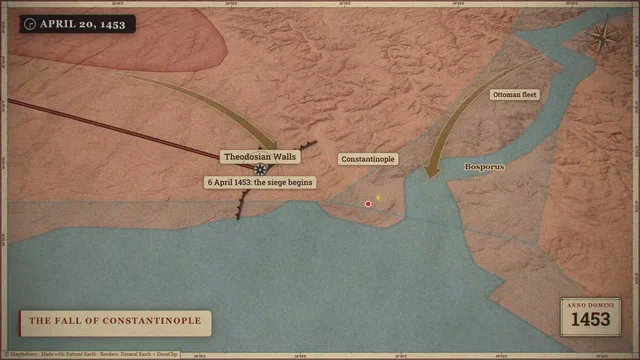
The sample on this page is Constantinople 1453: a historical map with torn-paper unfolds, a 12 fps overlay over a smooth camera and a whip pan, the kind of textured explainer look many history channels use. Open it and you will see each layer on its own track. Change the year, the labels or the route and the effect stays in place, because it belongs to the scene rather than to a single generated clip.
What Hera does that DocuClip does not
Hera generates images and freeform designs, which DocuClip does not do at all: DocuClip never invents a photo, a logo or footage. If you need an animated title card, a stylised promo or a shape-based motion design that is not a map, a page, a board, a chat or a chart, Hera’s canvas is the better place to make it. Hera lists MP4, GIF and transparent MOV exports, which suit overlays in any editor.
Pricing models
Hera works with credit-based subscription plans and, when we checked, did not publish its prices on its public site, so see hera.video for current terms. DocuClip’s paid plans are flat subscriptions without credits: Creator at $19 a month or $149 a year, Studio Pro at $49 a month or $299 a year. The Free Explorer is a free account that previews every sample and engine under a watermark, at 540p, and exports no files.
Using both
The two tools do not exclude each other. Many editors would make a title sequence or a stylised promo in a canvas tool and the map, document and data shots in DocuClip, then cut them together. On Studio Pro, transparent WebM exports and After Effects .jsx bundles make DocuClip shots easy to layer under titles made elsewhere.
How it compares
| Feature | DocuClip Studio | Hera |
|---|---|---|
| Starting point | Pick an engine (map, newspaper, chart, evidence board, chat) and give it your facts | A prompt on a canvas; generate images, design and animate |
| Generated imagery | None: no generated photos, logos or footage | Generates images and motion graphics |
| Accuracy of data | Borders from era data; bars and slices sized from your numbers; your own text set on the page | Editable motion graphics; you check the accuracy |
| Editing | Items on a multi-track timeline; every layer stays editable | Editable AI motion graphics on one canvas |
| Exports | MP4 on both paid plans; transparent WebM, PNG sequences and After Effects .jsx bundles on Studio Pro | MP4, GIF and transparent MOV |
| Pricing model | Flat subscriptions with no credits (see Pricing) | Credit-based subscription plans; see its site for prices |
| Free plan | Free Explorer: a free account (Google or e-mail), no card; every sample and engine in a watermarked 540p preview at 24 fps, globe scenes shown flat, 3 custom AI prompts; no file exports | “Get started for free” on its site |
Last reviewed November 2026. This comparison describes how each product works, not its price, and is not based on hands-on benchmarks. Sources: hera.video. Features change, so check the vendor’s own site before you decide. Product names belong to their owners; DocuClip Studio is not affiliated with them.
When another tool is better. Hera is the better choice for freeform motion design that is not tied to a map, a document or a dataset: animated titles, promos, social graphics and generated imagery, edited on one canvas.
Questions
- Does DocuClip Studio generate images or video with AI?
- No. The prompt bar drafts a scene (a route, a camera move, a layout, timings) from your sentence, but every picture element is drawn from map data, your text, your numbers or files you import. Nothing is invented as an image or as footage.
- Can DocuClip make the textured paper look?
- Yes, as one style among others: the Constantinople 1453 sample uses torn-paper unfolds, a 12 fps overlay over a smooth camera and a whip pan. The Vox-style guide shows how the parts fit together.
- Which one is cheaper?
- It depends on how you work. DocuClip’s paid plans are flat subscriptions without credits (Creator $19 a month, Studio Pro $49 a month); Hera uses credit-based plans whose prices are on its own site.
- Can I layer DocuClip shots under titles made in another tool?
- Yes. On Studio Pro you can export transparent WebM (VP9 with alpha), a lossless PNG sequence or an After Effects .jsx bundle, and place the shot under any title or graphic.
Free to explore, paid to export
- Free Explorer ($0): a free account (Google or e-mail), no card. Every sample and engine in a watermarked 540p preview at 24 fps (globe scenes are shown flat), 3 custom AI prompts and the pre-rendered sample NLE pack; no file exports.
- Creator ($19 a month or $149 a year): unlimited clean 1080p exports at up to 60 fps, clips up to 60 seconds, for your own channels.
- Studio Pro ($49 a month or $299 a year): 4K at 60 fps, exports up to 10 minutes, the 3D Globe, transparent alpha, batch NLE packs, smart reframe and After Effects .jsx bundles, for client work too.
⚡ Customize This Sample Free in Studio (1-Click Google Sign-In) → Compare the plans