DocuClip Studio › Alternatives › Maptake alternative
Comparison
A Maptake alternative for map videos that need more than a map
Maptake makes cinematic map videos in the browser: an AI agent flies the camera, draws borders and routes and adds labels on a timeline you can edit. DocuClip Studio also drafts map shots from a sentence, and puts four more documentary engines next to them.
⚡ Customize This Sample Free in Studio (1-Click Google Sign-In) →
Opens the Europe Flag Corridor sample in the studio after a free sign-in (Google or e-mail, no card).
How Maptake works
Maptake describes itself as a way to make cinematic map videos in your browser. You describe the shot, its AI agent flies the camera, draws real borders and routes and places labels, and you refine the result on a timeline where every shot, route and label is a layer. It uses Esri satellite imagery with 3D terrain, buildings, place search and routing, and its routes can follow real roads and trails. It exports MP4 directly, each shot as its own clip for CapCut, and on its Pro plan an After Effects pack. Its own site is clear that the agent does not generate photos or video footage.
How DocuClip Studio approaches the same job
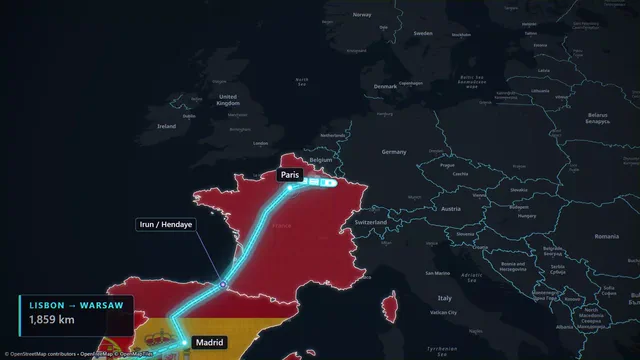
In DocuClip Studio the prompt bar drafts a map scene from a sentence too, but the map is drawn from open vector data (OpenStreetMap through OpenFreeMap, Natural Earth borders and openly licensed imagery) rather than from a satellite basemap. The look is closer to an atlas than to aerial footage: flag and texture fills, glowing borders, historical eras, labels that pop in on cue. The Europe Flag Corridor sample shows the idea: a corridor of countries fills with their flags, one after another, along a single route.
Every element is an item on the timeline, so you can drag a label to the beat of your narration or stretch a camera move without touching a keyframe. The borders of ten eras are built in, which matters if your channel covers history rather than present-day travel. Exports are rendered on your own computer, frame by frame, so nothing you import is uploaded and the result is the same on a slow laptop as on a fast desktop.
The honest differences
If you want the look of real satellite imagery and terrain, with routes along actual roads and trails, Maptake is built for that and DocuClip is not. If your map shots sit between newspaper headlines, evidence boards and charts, DocuClip keeps them in one studio with one export setting and one sound design. Maptake works with monthly credits for its AI agent; DocuClip’s paid plans are flat subscriptions without credits.
Clip lengths are close at the top: Maptake Studio and DocuClip Studio Pro both list exports of up to ten minutes. At the entry level Maptake Pro gives you 4K and three-minute videos, while DocuClip Creator gives you 1080p at up to 60 fps and clips of up to 60 seconds; for 4K you need Studio Pro.
Licences, side by side
Maptake’s free plan is for personal, non-commercial use with a watermark; Pro covers commercial use on your own channels, and Studio covers videos for your clients. DocuClip draws the same line: Creator covers one creator’s own monetised channels, and Studio Pro (or Founding 50) covers client, freelance and agency work. DocuClip’s Free Explorer exports no files at all: it is a watermarked preview of every sample and engine, for deciding before you pay.
Moving a project over
There is no importer for Maptake projects. Rebuilding a shot usually means typing the route as a sentence, picking an era or a modern map, and placing your labels on the timeline. If you have your own route data, DocuClip imports .geojson, .gpx, .kml and .csv files (Studio Pro), so a track you already have does not need to be redrawn by hand.
Try the corridor sample
Open the Europe Flag Corridor sample with a free account, swap the countries for the ones in your story and play it back. The watermarked preview runs every effect at 540p and 24 fps, which is enough to judge the motion and the timing on your own material before you decide on a plan.
How it compares
| Feature | DocuClip Studio | Maptake |
|---|---|---|
| Where it runs | In the browser; every frame is rendered on your own computer | In the browser; exports MP4 directly |
| How a shot starts | A sentence in the prompt bar drafts the route, camera and timing; you edit the items on the timeline | An AI agent flies the camera, draws borders and routes and adds labels; you edit on a timeline |
| Map look | Atlas-style vector maps, flag and texture fills, ten eras, satellite relief | Esri satellite imagery with 3D terrain and buildings |
| Routes | Great-circle, sea and multi-leg routes; your own GPX, KML or GeoJSON (Studio Pro) | Routing, including routes along real roads and trails |
| Free plan | Free Explorer: a free account (Google or e-mail), no card; every sample and engine in a watermarked 540p preview at 24 fps, globe scenes shown flat, 3 custom AI prompts; no file exports | Free: 100 AI credits a month, exports up to 1280 px and 10 seconds, watermark, personal non-commercial use, without audio, satellite or 3D terrain |
| Paid plans | Creator $19 a month or $149 a year; Studio Pro $49 a month or $299 a year | Pro $40 a month, or $30 a month billed yearly; Studio $80 a month, or $66.67 a month billed yearly |
| Largest export | Creator: 1080p at up to 60 fps, 60 s. Studio Pro: 4K at 60 fps, up to 10 minutes | Pro: up to 3840 px (4K) and 3 minutes. Studio: 4K and up to 10 minutes |
| AI credits | None on paid plans: flat subscriptions | Pro 1,000 and Studio 3,000 AI credits a month |
| Into your editor | MP4 on both paid plans; transparent WebM, PNG sequences, batch NLE packs and After Effects .jsx bundles on Studio Pro | Each shot as its own clip for CapCut; an After Effects pack on Pro |
| Other documentary shots | Newspapers and dossiers, evidence boards, chat dramatizations, chart races | Not listed on its site |
| Licence | Creator: your own monetised channels. Studio Pro: client and agency work too | Free: personal, non-commercial. Pro: commercial use on your own channels. Studio: videos for your clients |
Last reviewed November 2026. This comparison describes how each product works and is not based on hands-on benchmarks. Competitor prices as listed on their sites on 19 November 2026; they may change. Maptake’s yearly prices are shown per month and billed once a year. Sources: maptake.com/pricing, maptake.com. Prices of DocuClip Studio are in US dollars, before any sales tax or VAT. Features change too, so check the vendor’s own site before you decide. Product names belong to their owners; DocuClip Studio is not affiliated with them.
When another tool is better. Maptake is the better choice when you want real satellite imagery, 3D terrain and buildings, and routes that follow actual roads and trails, with an AI agent doing most of the camera work. Its Pro plan also reaches 4K at a lower month-to-month price than DocuClip Studio Pro.
Questions
- Does DocuClip Studio use satellite imagery like Maptake?
- DocuClip’s maps are drawn from open vector data, with satellite relief from openly licensed imagery; they are built for an atlas look rather than aerial footage. If your shot needs photorealistic terrain and buildings, Maptake or Google Earth Studio fits better.
- Does DocuClip Studio use AI credits?
- Not on the paid plans: Creator ($19 a month) and Studio Pro ($49 a month) are flat subscriptions with no credit balance. The free Free Explorer includes 3 custom AI prompts so you can try the prompt bar.
- Can I use my own route data?
- Yes. DocuClip imports .geojson, .gpx, .kml and .csv files (Studio Pro), so a recorded track or a dataset becomes a route or a highlighted area without redrawing it.
- Can I try DocuClip before paying?
- Yes. The Free Explorer is a free account (Google or e-mail) with no card. It opens all 10 sample projects and every engine in a watermarked 540p preview at 24 fps, with globe scenes shown flat, and includes 3 custom AI prompts; it exports no files. Clean exports start with Creator at $19 a month (1080p at up to 60 fps, clips up to 60 seconds); 4K, the 3D Globe and exports up to 10 minutes come with Studio Pro.
Free to explore, paid to export
- Free Explorer ($0): a free account (Google or e-mail), no card. Every sample and engine in a watermarked 540p preview at 24 fps (globe scenes are shown flat), 3 custom AI prompts and the pre-rendered sample NLE pack; no file exports.
- Creator ($19 a month or $149 a year): unlimited clean 1080p exports at up to 60 fps, clips up to 60 seconds, for your own channels.
- Studio Pro ($49 a month or $299 a year): 4K at 60 fps, exports up to 10 minutes, the 3D Globe, transparent alpha, batch NLE packs, smart reframe and After Effects .jsx bundles, for client work too.
⚡ Customize This Sample Free in Studio (1-Click Google Sign-In) → Compare the plans