DocuClip Studio › Alternatives › Google Earth Studio alternative
Comparison
A Google Earth Studio alternative for documentary maps
Google Earth Studio is Google’s animation tool for its satellite and 3D imagery. It is excellent at photorealistic flyovers, and it comes with conditions: Chrome only, a Google account, access on request, on-screen attribution and no commercial licence for the imagery. DocuClip Studio draws stylised maps instead, licensed for monetised channels on a paid plan.
⚡ Customize This Sample Free in Studio (1-Click Google Sign-In) →
Opens the Hormuz Chokepoint sample in the studio after a free sign-in (Google or e-mail, no card).
What Google Earth Studio is for
Earth Studio animates Google Earth’s satellite imagery and 3D buildings with keyframes, in the browser. It needs a Google account, works in Google Chrome only, and access is requested through a form; Google writes to you whether or not you are accepted. Renders run either in Google’s cloud or locally, and come out as an image sequence that you assemble into a video in another program. For a photorealistic swoop over a real city or mountain range, nothing in this comparison looks closer to the real Earth.
The licence question
Google’s Earth Studio FAQ asks for attribution on screen for the full length of the shot, naming Google Earth and the imagery providers. It also says that Google does not currently offer a licence to use Google Earth imagery for commercial applications. Read Google’s own FAQ and permission guidelines for your case. If your channel is monetised or you deliver to clients, this is the point to settle before you start a project.
What DocuClip draws instead
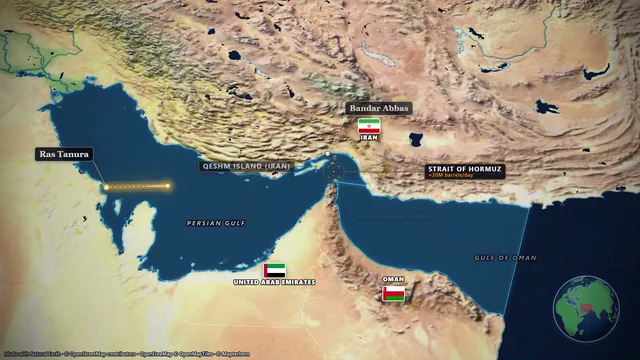
DocuClip Studio does not use Google imagery. Its maps are drawn from open data (OpenStreetMap through OpenFreeMap and OpenMapTiles, Natural Earth borders) with satellite relief from openly licensed imagery, in documentary looks: a parchment atlas, a dark geopolitics style, a clean minimal map, a blueprint schematic. The Hormuz Chokepoint sample starts on the 3D Globe and drops to the strait with tankers, labels and a distance counter; the free preview shows that globe opening flat, and Studio Pro exports it in 3D. On a paid plan the export is licensed for your monetised channels, with the map data credit kept in the frame or in your description.
Keyframes against items
Earth Studio is a keyframe animator: you set camera positions at moments in time and it interpolates between them. That gives precise control but takes time for every shot. DocuClip’s timeline holds items instead (a route, a label, a highlight, a camera move) that you drag to a moment and stretch to a length; you can still keep a camera position as a keyframe when you need one. A sentence in the prompt bar drafts the whole first pass.
From render to edit
Earth Studio hands you an image sequence to assemble. DocuClip exports a finished MP4 with sound design on both paid plans, rendered frame by frame on your own computer, and Studio Pro adds transparent WebM, lossless PNG sequences, batch NLE packs for Premiere, Final Cut and CapCut, and After Effects .jsx bundles. A map shot is ready to drop on the timeline without a separate encoding step.
When to use both
Some documentaries use a photoreal Earth flyover for an establishing shot and stylised maps for the explanation that follows. If Google’s terms fit your project, that combination works well: Earth Studio for the photoreal moment, DocuClip for routes, borders, labels and data.
How it compares
| Feature | DocuClip Studio | Google Earth Studio |
|---|---|---|
| Look | Stylised documentary maps, historical borders, satellite relief; the 3D Globe view on Studio Pro | Photorealistic Google Earth satellite imagery and 3D buildings |
| Where it runs | Chrome, Edge, Safari and Firefox | Google Chrome only |
| Access | A free Free Explorer account (Google or e-mail) to open and preview; a paid plan to export | A Google account and an access request |
| Animation | Timeline items; a sentence drafts the first pass | Camera keyframes |
| Output | A finished MP4 with sound design; transparent and NLE formats on Studio Pro | An image sequence (cloud or local render) to assemble elsewhere |
| Attribution | Keep the map data credit in the frame, or credit OpenStreetMap in the description | Google Earth and the imagery providers shown on screen for the whole shot |
| Commercial use | Licensed on paid plans: Creator for your own monetised channels, Studio Pro for client work too | Google says it does not currently offer a licence to use Google Earth imagery for commercial applications |
| Price | Free to explore; paid plans to export (see Pricing) | No price listed |
Last reviewed November 2026. This comparison describes how each product works, not its price, and is not based on hands-on benchmarks. Sources: Earth Studio FAQ, Earth Studio documentation. Features change, so check the vendor’s own site before you decide. Product names belong to their owners; DocuClip Studio is not affiliated with them.
When another tool is better. Google Earth Studio is the better choice when you need photorealistic terrain, cities and buildings from Google Earth, and your project fits Google’s attribution and licence terms.
Questions
- Can I use Google Earth Studio footage on a monetised YouTube channel?
- Check Google’s Earth Studio FAQ and permission guidelines for your case. The FAQ asks for on-screen attribution and says Google does not currently offer a licence to use Google Earth imagery for commercial applications. DocuClip exports made on a paid plan come with a commercial licence: Studio Pro covers client work too, and Creator covers your own monetised channels.
- Does DocuClip Studio have photorealistic 3D cities?
- No. It has stylised 3D buildings and country prisms, not photogrammetry. For photoreal cities, Earth Studio is the tool.
- Does DocuClip work in Safari and Firefox?
- Yes. It runs in current Chrome, Edge, Safari and Firefox on desktop. Exports use the browser’s video encoder, so the speed varies by browser and computer, while the frames come out the same. An export longer than two minutes is written straight to disk, which needs desktop Chrome or Edge.
- Is DocuClip free?
- Yes. The Free Explorer is a free account (Google or e-mail) with no card. It opens all 10 sample projects and every engine in a watermarked 540p preview at 24 fps, with globe scenes shown flat, and includes 3 custom AI prompts; it exports no files. Clean exports start with Creator at $19 a month (1080p at up to 60 fps, clips up to 60 seconds); 4K, the 3D Globe and exports up to 10 minutes come with Studio Pro.
Free to explore, paid to export
- Free Explorer ($0): a free account (Google or e-mail), no card. Every sample and engine in a watermarked 540p preview at 24 fps (globe scenes are shown flat), 3 custom AI prompts and the pre-rendered sample NLE pack; no file exports.
- Creator ($19 a month or $149 a year): unlimited clean 1080p exports at up to 60 fps, clips up to 60 seconds, for your own channels.
- Studio Pro ($49 a month or $299 a year): 4K at 60 fps, exports up to 10 minutes, the 3D Globe, transparent alpha, batch NLE packs, smart reframe and After Effects .jsx bundles, for client work too.
⚡ Customize This Sample Free in Studio (1-Click Google Sign-In) → Compare the plans