DocuClip Studio › Templates › Cold War › Instagram Reels
Cold War Iron Curtain Map for Instagram Reels
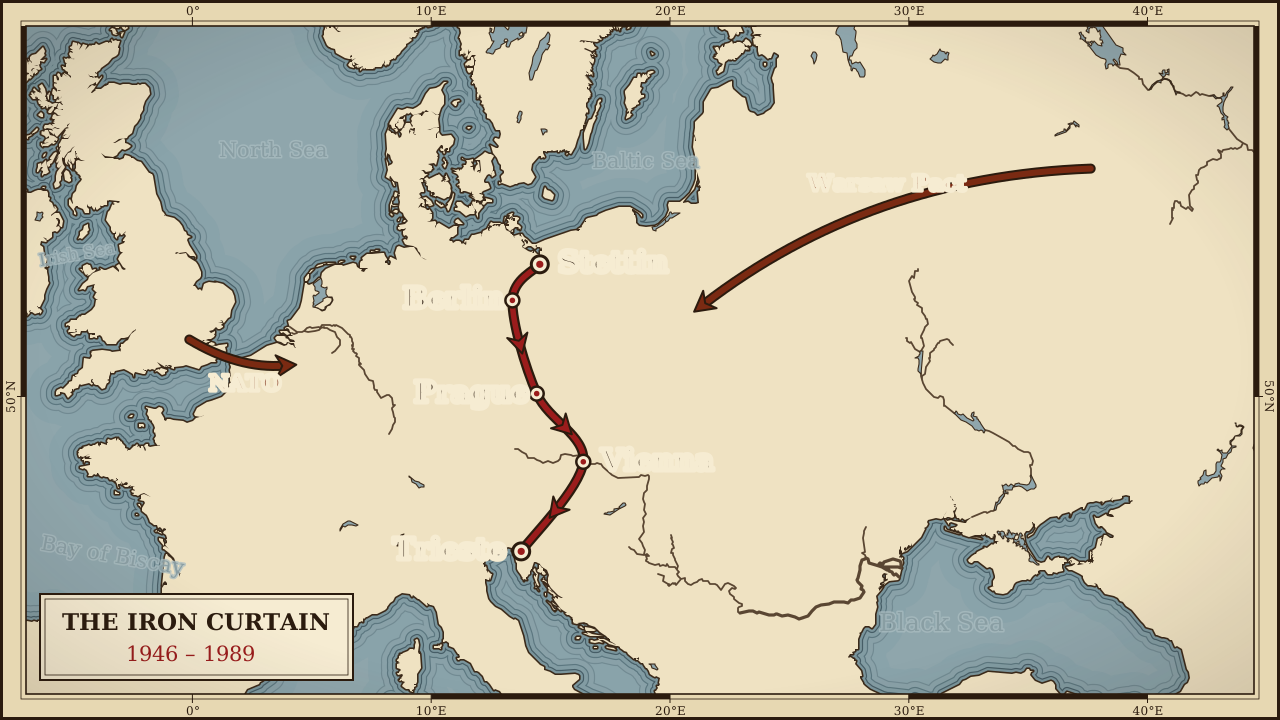
Draw the Iron Curtain from the Baltic to the Adriatic with both blocs lit up. Built for Reels creators: a 9-second vertical 9:16 scene, ready to edit.
⚡ Customize This Sample Free in Studio (Sign In Free) →Runs in your browser · Free Explorer: a free account (e-mail sign-in), no card · rendered on your device
The problem
The Cold War was fought over lines on a map, and audiences need to see which side of the line each capital sat on.
Template apps give every account the same look, and real motion design tools were never built for phones or tight turnarounds.
The usual fixes, a stock clip that almost fits or a freelancer who needs a week, do not work when you publish on a schedule.
The fix
DocuClip opens with a glowing line from Stettin to Trieste dividing NATO blue from Warsaw Pact red, with alliance links to London and Moscow, already composed for Instagram Reels at 1080 × 1920.
Treat it as a starting point. Every label, colour and camera move can be changed, and the preview updates as you type.
Match the colour grade to your feed, keep the camera move slow, and end on a frame that works as the cover image.
When it looks right, press Export MP4. The video is rendered frame by frame on your own computer, so it is never uploaded and there is no render queue.
What is inside this template
Reels audiences save and share polished explainers, and a cinematic graphic is what makes a post feel worth saving.
Real 3D camera
Cinematic fly-to, orbit and smooth pan-zoom moves with tilt and bearing, eased between keyframes you can drag on the timeline.
Historical borders
Opens set to the Cold War (1989) borders, with adjustable fill, glow and labels. These conquest-era borders and the conflict arrows are drawn on Creator and Studio Pro; the free preview plays the same camera and route without them.
Geodesic routes
5-stop great-circle route with a moving glowing dot, a live distance counter and a year counter.
Four atlas looks
Vintage Parchment Atlas, Dark Ops Geopolitics, Clean Documentary Minimal and Old Sepia Chronicle, applied to key-free OpenFreeMap vector tiles.
Arrows and markers
Pulsing invasion arrows, dashed alliance links and glowing markers that pop in on cue.
Offline place search
Find modern cities and ancient sites instantly, or click the map to pin a stop. No map API key, ever.
How to make a Cold War Iron Curtain Map in three steps
- Open the templatePress the button above and sign in free with an e-mail code. The map animation loads in your browser with the vertical 9:16 frame and 9-second timing already set.
- Make it yoursSearch for your own places, pick an era and a map style, and drag the camera keyframes.
- Export the MP4Click Export MP4. Exports start with Creator: clean 1080p at up to 60 fps, clips up to 60 seconds (subject to fair use); Studio Pro adds 4K at 60 fps and exports up to 10 minutes, ideal for vertical feeds. The free account previews it with a watermark.
| Engine | 3D Map Animator |
|---|---|
| Format | Instagram Reels · vertical 9:16 · 1080 × 1920 |
| Length | 9 seconds (adjustable; exports up to 60 s on Creator and up to 10 minutes on Studio Pro) |
| Export | H.264 MP4, rendered frame by frame on your device. Free Explorer: a watermarked 540p preview, no file exports · Creator: 1080p60 (subject to fair use) · Studio Pro: 4K60, transparent alpha and PNG sequences |
| Price | Free preview with a free account · Creator $19 a month or $149 a year · Studio Pro $49 a month or $299 a year · see all plans |
Questions
Is this Cold War Iron Curtain Map template really free?
Opening, editing and previewing it are. With a Free Explorer account (free: e-mail sign-in, no card) you can open it, edit everything and play the preview (the Cold War (1989) borders and the conflict arrows are drawn on a paid plan), watermarked at up to 540p and 24 fps, and run 3 custom AI prompts; the free account exports no files. Its preview shows every Studio Pro scene feature and effect, under a watermark (the conquest eras come with a paid plan), with globe scenes shown flat. Creator ($19 a month or $149 a year) exports clean 1080p at up to 60 fps, clips up to 60 seconds (subject to fair use); Studio Pro ($49 a month or $299 a year) adds 4K at 60 fps, exports up to 10 minutes, the 3D Globe, transparent alpha exports, the Script-to-B-Roll batch studio and timeline packs. Paid plans can be cancelled at any time. Refunds within 14 days are reviewed case by case under Paddle’s refund policy; statutory withdrawal rights always apply.
Will it fit Instagram Reels without cropping?
Yes. This page opens the vertical 9:16 version (1080 × 1920), timed to 9 seconds. Turn on the safe-zone guides to keep labels clear of the platform buttons.
Do I need a Google Maps or Mapbox API key?
No. The maps use open OpenStreetMap data served by OpenFreeMap, plus bundled Natural Earth data for the historical borders and the built-in place search. There is no map key to set up and no usage bill.
Does my video get uploaded anywhere?
No. DocuClip is a client-side app: the animation is drawn and encoded to H.264 MP4 inside your browser using WebCodecs. Your images, article text and chart data stay on your device; only a prompt you type into the AI prompt bar is sent to our server to plan the scene, and it is not stored.
How long does a 9-second export take?
It depends on your computer, the resolution and the frame rate, and the export dialog shows the time left while it runs. Because every frame is rendered offline rather than screen-recorded, a slower computer takes longer but produces exactly the same smooth result.
Can I use the videos commercially?
Yes, on a paid plan. Creator's licence covers one creator's own monetised YouTube, Shorts, TikTok and social channels; client, freelance and agency work needs Studio Pro, whose licence covers unlimited channels and client deliverables. Both licences are revoked on refund or chargeback, for the exports made under the refunded or charged-back payment. The free account exports no files; its preview is for personal evaluation only. For maps, keep the small data credit in the frame or credit OpenStreetMap contributors in your description.
Same scene, other formats
- Cold War Iron Curtain Map for a YouTube Documentary
- Cold War Iron Curtain Map for YouTube Shorts
- Cold War Iron Curtain Map for TikTok
- Cold War Iron Curtain Map for a Faceless History Channel
- Cold War Iron Curtain Map for a Square Social Post
- Cold War Iron Curtain Map for a Video Essay
- Cold War Iron Curtain Map for a Classroom Lesson
- Cold War Iron Curtain Map for a Podcast Clip
- Cold War Iron Curtain Map for a News Explainer
More Cold War templates for Instagram Reels
- Cuban Missile Crisis Map
- Berlin Airlift Map Animation
- Nuclear Arms Race Chart Animation
- Magellan Circumnavigation Map
- Napoleon's Invasion of Russia Map
- British Empire Trade Routes Map
Pair it with
Ready when you are
Open it, change the words, export. That is the whole workflow.
⚡ Customize This Sample Free in Studio (Sign In Free) →