DocuClip Studio › Text message video generator
Browser tool
A text message video generator for documentary dramatizations
Documentaries about fraud, leaks and scandals often reconstruct a conversation on screen: messages appear one by one, someone starts typing, a reply is read and ignored. DocuClip Studio’s Digital Forensics engine animates that thread for a dramatization you label as one, in our own generic chat design.
⚡ Customize This Sample Free in Studio (1-Click Google Sign-In) →
Opens the Broker Chat Leak sample in the studio after a free sign-in (Google or e-mail, no card).
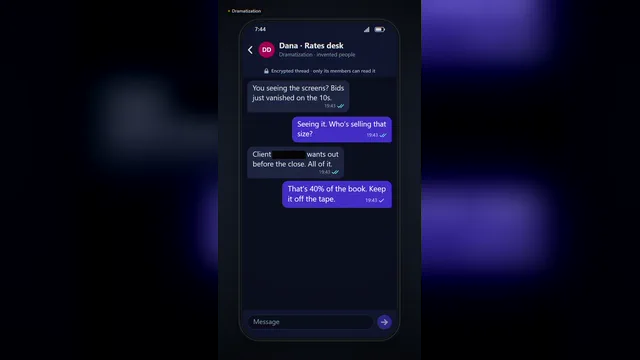
What the engine animates
A chat sequence is built message by message. Typing dots appear before each message, bubbles pop in with a soft spring, read ticks change as the other side reads, and words or names can be covered by redaction bars. Each step has its own interface sound, so the scene has rhythm before your narration is added. The same engine also builds post, forum and filing cards with rolling counters, and a search bar that types a query and zooms into a highlighted article.
Generic by design
The chat look is our own design: no messaging app’s name, logo, colours or layout. That keeps the shot neutral, avoids implying that a particular platform was involved, and keeps you clear of other companies’ trade dress. If your story depends on the real app, show the real screenshot, with permission, in the newspaper engine’s screenshot mode instead.
A dramatization, labelled as one
The sample on this page, Broker Chat Leak, is a dramatized thread between invented people, and it says so on screen. Use the engine the same way. Do not present an invented conversation as a real one, do not put words in a real person’s mouth, and do not use it to deceive anyone outside a clearly labelled story. When you reconstruct real messages from court records or reporting, keep the wording exact, cite the source and still label the scene as a reconstruction.
Making a thread readable
Viewers read chat more slowly than you think, especially in vertical video on a phone. Keep each message short, leave a beat after the important one, and let the typing dots carry the tension instead of more text. The sample is framed in 9:16 for Shorts, Reels and TikTok; switch to 16:9 for a YouTube documentary and the thread sits beside your other shots.
Timing to narration
Every message, typing pause, read tick and redaction is an item on the timeline. Drag the moment a reply appears to the beat in your voiceover where it should land, or stretch a typing pause to hold the suspense. Nothing has to be keyframed by hand, and changing a message re-times the rest of the thread.
Plans
The Free Explorer, a free account, previews the chat sample and every engine under a watermark at 540p and 24 fps and exports no files. Creator exports 1080p at up to 60 fps, which keeps the bubble motion smooth; Studio Pro adds 4K, transparent alpha for laying the thread over footage, and dual 16:9 + 9:16 smart reframe.
How it compares
| Feature | DocuClip Studio | Screen-recording a phone | Chat mock-up apps |
|---|---|---|---|
| Look | A generic chat design of our own; no app logos | The real app, with its branding | Often imitates a known messaging app |
| Animation | Typing dots, bubble pops, read ticks and redactions, timed on a timeline | Real time, as typed | Varies |
| Changes | Edit a message and the thread re-times | Record again | Edit and export again |
| Use in a documentary | Labelled dramatizations and reconstructions | Real conversations, shown with permission | Risky if it imitates a real app or person |
| Output | MP4 in 9:16, 16:9 or 1:1; transparent alpha on Studio Pro | A screen recording | Usually a video file |
Last reviewed November 2026. This comparison describes how each product works, not its price, and is not based on hands-on benchmarks. Features change, so check the vendor’s own site before you decide. Product names belong to their owners; DocuClip Studio is not affiliated with them.
When another tool is better. Screen-recording a real phone is the better choice when the conversation is real and you have permission to show it: nothing is more convincing than the original record.
Questions
- Can I make it look like a specific messaging app?
- No. The chat look is a generic design of our own, with no app names, logos or layouts. If the real app matters to your story, show a real screenshot with permission.
- Is it all right to make a fake text message video?
- A labelled dramatization is common in documentaries and fiction. Presenting invented messages as real, impersonating a real person or using a mock-up to deceive or harass someone can be unlawful and harmful. Label reconstructions and keep real quotes exact.
- Can I redact names and numbers?
- Yes. Any word in a message can be covered by a redaction bar, still or wiped in on cue.
- Does it work for vertical video?
- Yes. The sample is 9:16, and the same thread exports in 16:9 and 1:1 too.
Free to explore, paid to export
- Free Explorer ($0): a free account (Google or e-mail), no card. Every sample and engine in a watermarked 540p preview at 24 fps (globe scenes are shown flat), 3 custom AI prompts and the pre-rendered sample NLE pack; no file exports.
- Creator ($19 a month or $149 a year): unlimited clean 1080p exports at up to 60 fps, clips up to 60 seconds, for your own channels.
- Studio Pro ($49 a month or $299 a year): 4K at 60 fps, exports up to 10 minutes, the 3D Globe, transparent alpha, batch NLE packs, smart reframe and After Effects .jsx bundles, for client work too.
⚡ Customize This Sample Free in Studio (1-Click Google Sign-In) → Compare the plans