DocuClip Studio › Declassified document generator
Browser tool
A declassified document generator for documentary videos
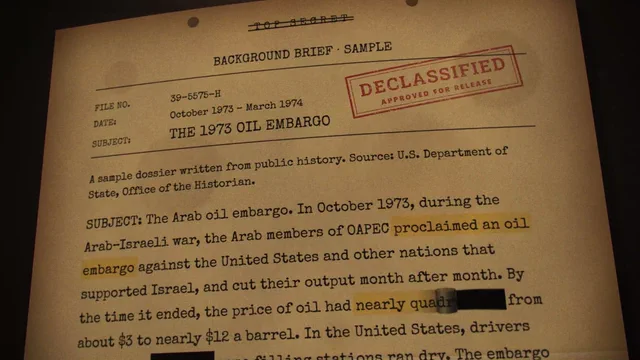
Intelligence stories, court cases and leaks often need a document on screen: typed paragraphs, black redaction bars, a classification stamp and a slow zoom to the one line that matters. DocuClip Studio builds that dossier from your text, in your browser, as a clearly styled reconstruction.
⚡ Customize This Sample Free in Studio (1-Click Google Sign-In) →
Opens the 1973 Oil Embargo Dossier sample in the studio after a free sign-in (Google or e-mail, no card).
What “declassified-style” means here
The dossier style produces a document that looks like a typed file: monospaced paragraphs, a header block, redaction bars over the words you choose, classification-style stamps and paper texture. It is a design, not a copy of any real agency’s forms, seals or letterheads, and it does not imitate a real document. Use it to illustrate a story you are telling, the way a documentary uses a reconstruction.
Building one
Open the 1973 Oil Embargo Dossier sample from the button above. Paste your own text into the document, select the words to redact and the line to highlight, and choose where the stamps land. The camera starts wide on the page and pushes in to the highlight; redaction bars can sit still or wipe in on cue. Every part is an item on the timeline, so you can time a stamp to a beat or reveal a redacted name at the moment your narrator says it.
Use it honestly
A styled document can mislead if it is presented as a real one. Label reconstructions on screen or in your narration, do not put real people’s signatures or real agency seals on invented text, and when you show a real declassified record, show the record itself and say where it came from. If you quote from a real file, keep the wording exact. Those habits keep a documentary credible and keep you out of trouble.
Sources for real documents
Many governments publish declassified records in public archives and reading rooms. When your story rests on one, upload a screenshot of the real page in the newspaper engine’s screenshot mode and highlight it there; the image stays on your device. Use the dossier style when you need a clean, readable reconstruction of a passage, or when the original is too faded to read on a phone screen.
Plans and export
Dossiers and breaking-wire cards come with Studio Pro. Studio Pro exports 4K at 60 fps, up to 10 minutes, and a transparent WebM if you want the paper over your own footage; the 1973 sample is set up for 4K. The Free Explorer, a free account, opens the sample and lets you edit it in a watermarked 540p preview; it exports no files.
Related shots
The same studio makes the newspaper highlight effect for printed articles, a red-string evidence board for connecting people and money, and chat sequences for dramatized conversations. Together they cover most of the paper trail a documentary needs to show, in one consistent look.
How it compares
| Feature | DocuClip Studio | Photo editor mock-up | After Effects template |
|---|---|---|---|
| Setup | Paste text; choose the redactions, stamps and highlight | Design the page by hand | Replace the template’s text and layers |
| Animation | Camera push-in, redaction wipes and stamps timed on the timeline | None; animate it elsewhere | Built into the template |
| Changes | Edit the text and the page re-flows | Redo the layout | Edit the layers in After Effects |
| Your real documents | Screenshot mode highlights an uploaded page; the image stays on your device | Any image | Any image |
| Cost | Free to explore; paid plans to export (see Pricing) | Your photo editor | An After Effects subscription plus the template |
Last reviewed November 2026. This comparison describes how each product works, not its price, and is not based on hands-on benchmarks. Features change, so check the vendor’s own site before you decide. Product names belong to their owners; DocuClip Studio is not affiliated with them.
When another tool is better. A photo editor is the better choice for a single still you will show for a second. An After Effects template is better when you need one specific designed look across a whole series and already work in After Effects.
Questions
- Is it all right to make a declassified-style document?
- A clearly styled reconstruction that illustrates a story is common practice in documentaries. Presenting invented text as a real government record, or copying a real seal or signature, can mislead viewers and may be unlawful; label reconstructions and cite real records.
- Can I redact words in my own text?
- Yes. Select the words and they become redaction bars, which can stay still or wipe in on cue.
- Can I add stamps?
- Yes. Classification-style stamps can be placed on the page and timed on the timeline like any other item.
- Which plan do I need?
- Dossiers come with Studio Pro, and the 1973 sample is set up for 4K, which needs Studio Pro. Opening, editing and a watermarked preview of the sample are free with a Free Explorer account.
Free to explore, paid to export
- Free Explorer ($0): a free account (Google or e-mail), no card. Every sample and engine in a watermarked 540p preview at 24 fps (globe scenes are shown flat), 3 custom AI prompts and the pre-rendered sample NLE pack; no file exports.
- Creator ($19 a month or $149 a year): unlimited clean 1080p exports at up to 60 fps, clips up to 60 seconds, for your own channels.
- Studio Pro ($49 a month or $299 a year): 4K at 60 fps, exports up to 10 minutes, the 3D Globe, transparent alpha, batch NLE packs, smart reframe and After Effects .jsx bundles, for client work too.
⚡ Customize This Sample Free in Studio (1-Click Google Sign-In) → Compare the plans