DocuClip Studio › Johnny Harris–style maps
Style guide
Johnny Harris–style maps: an inspired-by guide
Johnny Harris’s explainer videos made a certain kind of map famous: a camera that dives from the globe to a single place, routes drawn as if by hand, paper textures, bold labels and notes that appear as he talks. This guide breaks that look into parts and shows how to build your own version in DocuClip Studio.
DocuClip Studio is not affiliated with or endorsed by Johnny Harris.
⚡ Customize This Sample Free in Studio (1-Click Google Sign-In) →
Opens the Hormuz Chokepoint sample in the studio after a free sign-in (Google or e-mail, no card).
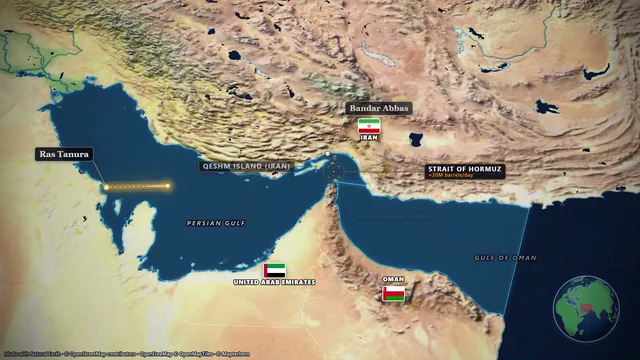
What viewers mean by the style
When people ask for “Johnny Harris maps”, they usually mean a handful of choices rather than one effect. The map is a character in the story, not a backdrop. The camera moves constantly, often from a wide view of the globe down to one city, strait or border. Routes and arrows are drawn on while the narrator talks. The map has texture (paper, print, grain) instead of a flat digital look, and labels and notes point at exactly what matters. This page describes those elements in general terms, as viewers see them on screen; it is not based on, and does not reproduce, his project files, assets or methods.
Building the parts in DocuClip
The Hormuz Chokepoint sample is a good starting point: the camera begins on the globe, drops to the Gulf and follows tankers through the strait while labels appear on cue. Change the stops to your own story and pick a textured look such as the parchment atlas or the sepia chronicle. Routes draw on as items on the timeline, arrows and markers pop in where you place them, and a distance or year counter can run alongside.
For a historical story, choose an era: the borders of ten eras are built in, from 2000 BC to the Cold War and today, so you can show the map as it was rather than as it is.
Make it yours
Copying a creator’s look exactly is neither necessary nor a good idea. Viewers recognise imitation, and your channel needs its own identity. Take the principles (the map as a storyteller, purposeful camera moves, texture, annotation) and choose your own palette, typography and pacing. On Studio Pro you can save them as a brand kit, so every map in your series looks like yours rather than like someone else’s.
Pacing the camera to your voice
The style depends on timing: the map moves when the sentence moves. Drag each camera move, route and label to the moment in your narration it belongs to. Because every part is an item rather than a set of keyframes, re-timing a shot after you change the script takes seconds rather than an evening. Leave a beat of stillness before a big reveal; constant motion only works if something occasionally stops.
Exports for the format
Explainer maps work in widescreen and vertical. Export MP4 in 16:9 for YouTube or 9:16 for Shorts and Reels; on Studio Pro, dual 16:9 + 9:16 smart reframe exports both from one scene, and the 3D Globe view used at the start of this sample is part of that plan (the free preview shows it flat). Creator exports 1080p at up to 60 fps.
A note on credit and permission
If a creator’s work inspired your style, saying so is a kind gesture but not a licence: never use their footage, music, graphics, name or likeness in your videos without permission. His name is used on this page only to describe a style that viewers search for.
The look, part by part
| Element of the look | In DocuClip Studio | By hand in After Effects |
|---|---|---|
| Globe-to-place camera dives | Drafted from the route; the 3D Globe view on Studio Pro | Keyframed scale and position, often with a 3D plugin |
| Routes drawn on | Route items that draw themselves, timed on the timeline | Masked or trimmed strokes, keyframed |
| Paper and print texture | Textured map looks such as parchment and sepia | Texture overlays and blend modes |
| Labels and notes | Labels, markers and arrows that pop in on cue | Text layers animated one by one |
| Historical borders | Ten built-in eras | Imported and cleaned historical data |
| Re-timing after a script change | Drag the items | Move the keyframes |
Last reviewed November 2026. This guide describes a visual style in general terms, as viewers see it on screen, and how to build your own version; it does not describe or reproduce any creator’s own files, assets or methods. DocuClip Studio is not affiliated with or endorsed by Johnny Harris.
When another tool is better. If you already have a polished After Effects workflow with your own textures and plugins, staying there gives you more control over every frame. DocuClip is the faster path to a consistent series of map shots.
Questions
- Is this an official Johnny Harris template?
- No. DocuClip Studio is not affiliated with or endorsed by Johnny Harris. This guide describes the general elements of a style viewers associate with his videos and shows how to build your own version.
- Can I use his footage or graphics?
- Not without permission. Use your own visuals; DocuClip draws the maps from open data, so you start from your own material.
- Which sample should I start with?
- Hormuz Chokepoint: it starts on the globe and drops to a strait with labels and a route. Change the places and pick a textured look.
- Which plan do I need?
- Opening, editing and a watermarked 540p preview are free with a Free Explorer account. Creator exports 1080p at up to 60 fps; the 3D Globe view and 4K come with Studio Pro.
Free to explore, paid to export
- Free Explorer ($0): a free account (Google or e-mail), no card. Every sample and engine in a watermarked 540p preview at 24 fps (globe scenes are shown flat), 3 custom AI prompts and the pre-rendered sample NLE pack; no file exports.
- Creator ($19 a month or $149 a year): unlimited clean 1080p exports at up to 60 fps, clips up to 60 seconds, for your own channels.
- Studio Pro ($49 a month or $299 a year): 4K at 60 fps, exports up to 10 minutes, the 3D Globe, transparent alpha, batch NLE packs, smart reframe and After Effects .jsx bundles, for client work too.
⚡ Customize This Sample Free in Studio (1-Click Google Sign-In) → Compare the plans