DocuClip Studio › Vox-style motion graphics
Style guide
Vox-style documentary motion graphics: an inspired-by guide
Vox’s explainer videos helped define a look many channels now use: layered paper and cutouts, documents with highlighted lines, maps with texture and a camera that keeps moving through it all. This guide breaks the look into parts and shows how to build your own version in DocuClip Studio.
DocuClip Studio is not affiliated with or endorsed by Vox.
⚡ Customize This Sample Free in Studio (1-Click Google Sign-In) →
Opens the Constantinople 1453 sample in the studio after a free sign-in (Google or e-mail, no card).
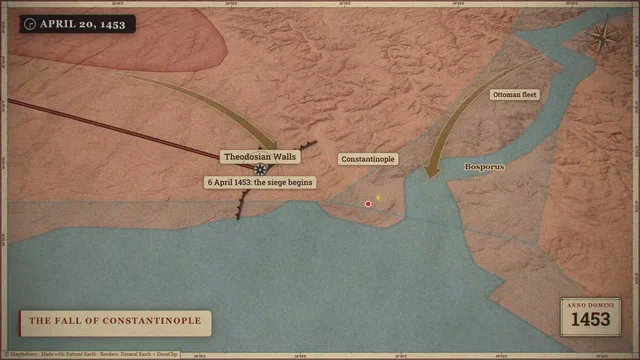
What viewers mean by the style
People who ask for “Vox-style” motion graphics usually mean collage: archival photos and documents cut out and layered like paper, torn edges, a slightly stepped, hand-made rhythm to some of the animation, highlighted phrases in printed text, simple bold maps and charts, and a camera that pans and pushes through the layers instead of cutting. This page describes those elements in general terms, as viewers see them on screen; it is not based on, and does not reproduce, Vox’s project files, assets or methods.
The Constantinople sample
The Constantinople 1453 sample combines several of these elements on a historical map: torn-paper unfolds reveal the scene, a 12 fps overlay gives the texture a stepped, hand-made rhythm while the camera itself stays smooth, and a whip pan carries the eye to the next beat. Open it and each effect sits on its own track, so you can see what does what before you change anything.
Paper, cutouts and documents
For document beats, the newspaper engine sets your text on a page and sweeps a marker across the words that matter, with paper grain and a 3D camera move. Upload a scan you have the right to use in screenshot mode to highlight a real page. For maps, choose a textured look and an era; for numbers, use a bar or line race or an exact-share donut, and keep the palette consistent with the rest of the video.
Rhythm and restraint
The collage look can get busy. Pick one or two textures for a whole video, keep type sizes consistent, and let each layer arrive with a purpose: a torn edge to reveal, a highlight to point, a whip pan to change subject. A 12 fps overlay works because it contrasts with smooth camera motion; use it as an accent rather than everywhere.
Make it yours
The principles travel; the exact look should not. Choose your own palette, typefaces, paper textures and music, and keep them across a series so that viewers recognise your channel. On Studio Pro you can save them as a brand kit. Never use another publisher’s footage, graphics, music or logo without permission; the name Vox is used on this page only to describe a style that viewers search for.
Exports
Export MP4 in 16:9 for YouTube or 9:16 for Shorts and Reels. Creator exports 1080p at up to 60 fps, which the sample uses for its smooth camera; Studio Pro adds 4K, exports up to 10 minutes and transparent alpha for layering over your own footage. The free Free Explorer preview plays the sample under a watermark at 540p and 24 fps.
The look, part by part
| Element of the look | In DocuClip Studio | By hand in After Effects |
|---|---|---|
| Torn-paper reveals | A torn-paper unfold effect on the timeline | Masks, displacement and paper textures |
| Stepped, hand-made rhythm | A 12 fps overlay over a smooth camera | Posterize Time on chosen layers |
| Highlighted documents | Newspaper engine with marker sweeps | Scans with masks and keyframes |
| Textured maps | Map looks and ten eras | A map plugin or imported data, with textures |
| Whip pans | A whip pan with motion blur and a slight RGB split | Camera moves with motion blur |
Last reviewed November 2026. This guide describes a visual style in general terms, as viewers see it on screen, and how to build your own version; it does not describe or reproduce any creator’s own files, assets or methods. DocuClip Studio is not affiliated with or endorsed by Vox.
When another tool is better. If you need a fully bespoke collage with your own scanned materials, cut by hand frame by frame, After Effects gives you complete control. DocuClip is the faster way to keep a consistent collage look across many shots.
Questions
- Is this an official Vox template?
- No. DocuClip Studio is not affiliated with or endorsed by Vox. This guide describes the general elements of a style viewers associate with Vox’s explainers and shows how to build your own version.
- How do I get the stepped animation look?
- Use the 12 fps overlay on texture layers while the camera stays smooth; the Constantinople 1453 sample shows the combination.
- Can I use archival photos?
- Yes, if you have the right to use them. Images you add are processed on your device and are not uploaded.
- Which plan do I need?
- Opening, editing and a watermarked 540p preview are free with a Free Explorer account. Creator exports 1080p at up to 60 fps; Studio Pro adds 4K, longer exports and transparent alpha.
Free to explore, paid to export
- Free Explorer ($0): a free account (Google or e-mail), no card. Every sample and engine in a watermarked 540p preview at 24 fps (globe scenes are shown flat), 3 custom AI prompts and the pre-rendered sample NLE pack; no file exports.
- Creator ($19 a month or $149 a year): unlimited clean 1080p exports at up to 60 fps, clips up to 60 seconds, for your own channels.
- Studio Pro ($49 a month or $299 a year): 4K at 60 fps, exports up to 10 minutes, the 3D Globe, transparent alpha, batch NLE packs, smart reframe and After Effects .jsx bundles, for client work too.
⚡ Customize This Sample Free in Studio (1-Click Google Sign-In) → Compare the plans