DocuClip Studio › Red string detective board maker
Browser tool
A red string detective board maker for documentary videos
The conspiracy board is shorthand for “follow the money”: photos and documents pinned to a wall, red string running between them, a camera that moves from clue to clue. DocuClip Studio’s Evidence Board engine builds that wall in 3D from the people, companies and transfers in your story.
⚡ Customize This Sample Free in Studio (1-Click Google Sign-In) →
Opens the Red-String Money Wall sample in the studio after a free sign-in (Google or e-mail, no card).
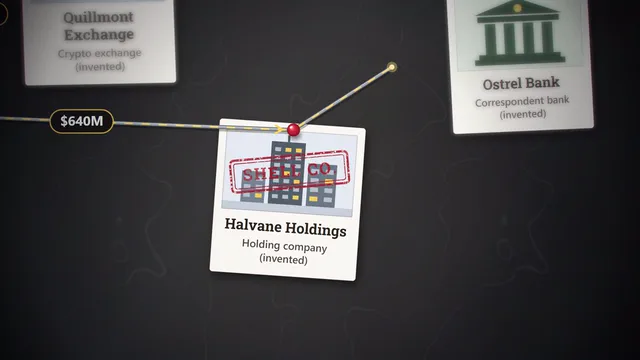
What the engine draws
Each element on the wall is a node: a photo of a person, a company, a bank or an offshore entity, pinned in place. Strings connect the nodes and draw themselves on cue, with an amount label, such as a transfer figure, riding along the line. Stamps mark what the story needs marked (a shell company, frozen funds, a confidential file), a spotlight roves across the wall and a shallow depth of field blurs the background, so the eye goes where the camera goes. Pins and pulled strings have their own sound cues.
The sample
The Red-String Money Wall sample shows a money trail pinned to a 3D evidence wall: polaroids, shell companies and wire transfers, connected one string at a time. Open it to see how the nodes, strings and camera moves sit on the timeline. Replace the photos with your own (they stay on your device), rename the companies, change the amounts, and the wall lays itself out again.
Building a board for your story
Start with the question the board answers, not with everything you know. List the five to ten entities the viewer has to remember and the transfers or relationships that connect them. Add them as nodes, connect them in the order your narration reveals them, and let the camera move from one node to the next as each string draws. A board that reveals itself step by step is far easier to follow than a full wall shown at once.
Facts and fairness
An evidence board implies wrongdoing by its very look, so the facts on it need care. Use names and amounts from court filings, regulators or established reporting, say on screen where they come from, and mark allegations as allegations. If a company or a person was cleared, show that too. The samples follow the same rule: widely reported public facts with the source named, or a clear “Illustrative data” label.
Looks and formats
The wall comes in several looks, from a cork board to darker and blueprint-style backgrounds, and exports as MP4 in 16:9, 9:16 or 1:1. Creator exports 1080p at up to 60 fps, which this sample uses for smooth string motion; Studio Pro adds 4K, exports up to 10 minutes and transparent alpha. The free Free Explorer preview plays the board under a watermark at 540p and 24 fps.
By hand, for comparison
Building the same shot by hand means photographing or designing a board, then animating each string with a mask or a stroke effect and moving a camera across a still. It can look great, and it takes a long time to change. In the engine, a new name or a new transfer is one more node and one more string.
How it compares
| Feature | DocuClip Studio | After Effects template | A physical board, filmed |
|---|---|---|---|
| Setup | Add people, companies, banks and offshore entities as nodes | Replace placeholder images and text | Print, pin and light a real board |
| Strings | Draw themselves on cue, with amount labels | Animated strokes in the template | Real string, filmed |
| Camera | 3D moves from node to node, depth of field and a roving spotlight | Built into the template | Your camera and lights |
| Changes | Add or rename a node and the wall lays itself out again | Edit the layers in After Effects | Re-pin and re-shoot |
| Sound | Pin and string-pull cues in the sound design | Add your own | Recorded on set |
Last reviewed November 2026. This comparison describes how each product works, not its price, and is not based on hands-on benchmarks. Features change, so check the vendor’s own site before you decide. Product names belong to their owners; DocuClip Studio is not affiliated with them.
When another tool is better. A physical board filmed on set is the better choice when you want real texture and have the time and space to build and light it. An After Effects template is better when you need one exact designed look and already work in After Effects.
Questions
- Can I use real photos of people?
- You can use photos you have the right to use. They are processed on your device and not uploaded. Be careful with real people on an evidence board: name your sources and mark allegations as allegations.
- Can the strings show amounts?
- Yes. A string can carry a label, such as a transfer amount, that travels with it as it draws.
- Does it work in vertical video?
- Yes. The board exports in 9:16 as well as 16:9 and 1:1; keep the labels inside the safe zones for Shorts and Reels.
- Which plan do I need?
- The sample needs Creator for a clean 60 fps export; Studio Pro adds 4K and transparent alpha. Opening, editing and a watermarked preview of the board are free with a Free Explorer account.
Free to explore, paid to export
- Free Explorer ($0): a free account (Google or e-mail), no card. Every sample and engine in a watermarked 540p preview at 24 fps (globe scenes are shown flat), 3 custom AI prompts and the pre-rendered sample NLE pack; no file exports.
- Creator ($19 a month or $149 a year): unlimited clean 1080p exports at up to 60 fps, clips up to 60 seconds, for your own channels.
- Studio Pro ($49 a month or $299 a year): 4K at 60 fps, exports up to 10 minutes, the 3D Globe, transparent alpha, batch NLE packs, smart reframe and After Effects .jsx bundles, for client work too.
⚡ Customize This Sample Free in Studio (1-Click Google Sign-In) → Compare the plans