DocuClip Studio › MagnatesMedia-style editing
Style guide
MagnatesMedia-style editing: an inspired-by guide
Business documentaries in the style viewers associate with MagnatesMedia tell corporate stories like thrillers: a dark palette, documents and headlines on screen, money moving between companies, a board where the connections finally click. This guide breaks the look into parts and shows how to build your own version in DocuClip Studio.
DocuClip Studio is not affiliated with or endorsed by MagnatesMedia.
⚡ Customize This Sample Free in Studio (1-Click Google Sign-In) →
Opens the Red-String Money Wall sample in the studio after a free sign-in (Google or e-mail, no card).
What viewers mean by the style
Ask viewers what makes this kind of business documentary feel tense and they tend to name the same elements: low-key, contrasty images; headlines and filings that fill the frame with one phrase highlighted; money shown as movement, a figure travelling from one company to another; evidence boards where photos, names and transfers are connected; and a pace that keeps cutting to the next clue. This page describes those elements in general terms, as viewers see them on screen; it is not based on, and does not reproduce, any channel’s project files, assets or methods.
The evidence wall
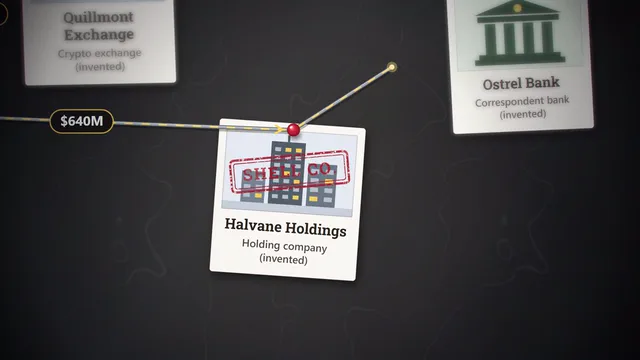
The Red-String Money Wall sample is the centrepiece: polaroids, shell companies and wire transfers pinned to a 3D wall, connected by strings that draw themselves with amount labels while a spotlight moves from clue to clue. Replace the nodes with the companies and people in your story and connect them in the order your narration reveals them, so the board pays off at the end rather than at the start.
Headlines, filings and chats
Around the wall, the other engines cover the paper trail. The newspaper engine sweeps a marker across a headline; the dossier style shows a filing with redactions and stamps; the digital-forensics engine plays a dramatized chat or a post with rolling counters, in generic designs; a candlestick ticker shows a share price collapsing. Keep them in one dark palette and they read as one story.
Pacing
The style moves fast, but each clue still needs a beat to land. Give the important figure its own moment, let a string finish drawing before the camera moves on, and use sound cues (a pin, a pulled string, a stamp) to punctuate rather than to fill. Every element is an item on the timeline, so tightening the pace after a rough cut is a matter of dragging.
Facts first
A thriller tone makes facts more important, not less. Take names, amounts and dates from court filings, regulators and established reporting, show the source on screen, and mark allegations as allegations. Dramatized chats should be labelled as dramatizations of what the records describe, never presented as the real messages.
Make it yours
Copying a channel’s look exactly is neither necessary nor wise. Keep the principles (documents on screen, money as movement, a board that pays off) and choose your own colours, fonts and music. On Studio Pro you can save them as a brand kit. Never use another creator’s footage, music, graphics or name in your videos without permission; the channel’s name is used on this page only to describe a style that viewers search for.
The look, part by part
| Element of the look | In DocuClip Studio | By hand in a video editor |
|---|---|---|
| Evidence board with money trails | 3D wall with photo, company, bank and offshore nodes; strings with amount labels | A photographed or designed board with animated strokes |
| Highlighted headlines and filings | Newspaper and dossier styles with marker sweeps and redactions | Scans with masks and scale keyframes |
| Dramatized chats and posts | Digital-forensics engine in generic designs, labelled as dramatizations | Screen recordings or mock-ups |
| Market crash | Candlestick ticker and exact-share donut | Chart templates or screenshots |
| Sound punctuation | Pin, string and interface cues in the sound design | Sound effects placed by hand |
Last reviewed November 2026. This guide describes a visual style in general terms, as viewers see it on screen, and how to build your own version; it does not describe or reproduce any creator’s own files, assets or methods. DocuClip Studio is not affiliated with or endorsed by MagnatesMedia.
When another tool is better. If your channel already has a mature edit in Premiere or After Effects with custom-designed assets, a hand-built board or chart will match it more closely. DocuClip is the faster way to a consistent set of evidence, document and data shots.
Questions
- Is this an official MagnatesMedia template?
- No. DocuClip Studio is not affiliated with or endorsed by MagnatesMedia. This guide describes the general elements of a style viewers associate with the channel and shows how to build your own version.
- Can I show real company logos on the board?
- Logos are trademarks. Rules for showing one to identify a company in news or commentary differ by country and platform; when in doubt, use the company name as text. DocuClip does not supply third-party logos.
- Which sample should I start with?
- Red-String Money Wall for the board, then the 1973 Oil Embargo Dossier and Chip Crash: Candles & Donut for documents and market charts.
- Which plan do I need?
- Opening, editing and a watermarked 540p preview are free with a Free Explorer account. Creator exports 1080p at up to 60 fps for your own channels; Studio Pro adds 4K, transparent alpha and client work.
Free to explore, paid to export
- Free Explorer ($0): a free account (Google or e-mail), no card. Every sample and engine in a watermarked 540p preview at 24 fps (globe scenes are shown flat), 3 custom AI prompts and the pre-rendered sample NLE pack; no file exports.
- Creator ($19 a month or $149 a year): unlimited clean 1080p exports at up to 60 fps, clips up to 60 seconds, for your own channels.
- Studio Pro ($49 a month or $299 a year): 4K at 60 fps, exports up to 10 minutes, the 3D Globe, transparent alpha, batch NLE packs, smart reframe and After Effects .jsx bundles, for client work too.
⚡ Customize This Sample Free in Studio (1-Click Google Sign-In) → Compare the plans